mimikara-nihongo
 # 耳から日本語 · Mimikara Nihongo
### Learn Japanese by ear, from the anime and audiobooks you actually watch and listen to.
https://github.com/user-attachments/assets/ad7c62be-9691-4050-81fc-b96afe129e3f
[**📱 Install the app**](#-install-the-app-on-your-phone) · [**Features**](#-features) · [**Quick start**](#-quick-start) · [**Setup guide**](#-setup-guide) · [**Anki**](#6-set-up-anki) · [**FAQ**](#-faq)
# 耳から日本語 · Mimikara Nihongo
### Learn Japanese by ear, from the anime and audiobooks you actually watch and listen to.
https://github.com/user-attachments/assets/ad7c62be-9691-4050-81fc-b96afe129e3f
[**📱 Install the app**](#-install-the-app-on-your-phone) · [**Features**](#-features) · [**Quick start**](#-quick-start) · [**Setup guide**](#-setup-guide) · [**Anki**](#6-set-up-anki) · [**FAQ**](#-faq)
Mimikara Nihongo (“Japanese from your ears”) turns your own anime episodes and Japanese audiobooks into bite-sized listening practice.
A Python script on your PC cuts every subtitle line into its own clip, analyses the sentence (words, readings, meanings, JLPT grammar, difficulty) and packs each episode into a .zip. The web app on your phone imports those packs and turns them into drills with spaced repetition, a reader, a vocabulary list, word flashcards, progress charts and one-tap Anki cards.
[!NOTE] Everything runs in the browser and is stored on your phone. It works offline, and there is no account or server. The app’s interface is in Japanese, for immersion; this README gives the English meaning of every button you need.
✨ Features at a glance
| Feature | What it does | |
|---|---|---|
| 🎧 | Real clips | Every sentence plays its own clip from the episode, with replay, speeds from 0.5× to 1.25× (or automatic) and audio-only mode. |
| ✍️ | 8 drills | Dictation, fill in the blank, sentence order, listening, grammar, shadowing, pitch accent and kanji, plus a mixed mode and a step-by-step mode for hard lines. |
| 🎯 | Today’s weak points | Finds the sounds, pitch patterns, grammar, words and lines you get wrong, and builds a round from them. |
| 🔍 | Search | Words, lines (Japanese, reading or translation), grammar and kanji across all your episodes. |
| 👂 | Minimal-pair listening | Four versions of the same line that differ by one small sound (っ, long vowels, ゛, ゃゅょ). |
| 📈 | Pitch accent | Hear and choose the high-low pattern of a word, with same-reading words that rise and fall differently. |
| 🎤 | Shadowing scores | Record yourself and get scores for intonation (pitch curve), rhythm and pronunciation. |
| 🔁 | Spaced repetition | Mistakes come back in 10 minutes; correct answers come back later and later, up to 120 days. |
| 🃏 | Word cards | Vocabulary flashcards made from your episodes, each with a real example line and its clip. |
| 📖 | Reader | The whole episode line by line, with translation, speaker and optional furigana. |
| 📺 | Watch whole episodes | Play an episode from start to finish with a live transcript, or full screen with karaoke-style Japanese subtitles. |
| 📚 | Dictionary and grammar | Tap any word for its meaning (JMdict, or all your own Yomitan dictionaries in your order); 560 JLPT grammar patterns from N5 to N1 with examples. |
| 📊 | Progress | Daily goal, streaks, a 30-day chart, a skills profile, accuracy for each drill and for each kind of sound. |
| 🎁 | Yearly wrap-up | Every January, a story-style summary of your year (days, hours, anime, audiobooks, words) that you can save as a PDF. |
| 🗂️ | Anki | Turn any line into an Anki card with its video, pitch accent and definitions, via .apkg or straight into AnkiDroid. |
| 📕 | Audiobooks | Japanese audiobooks become the same drills, plus whole-chapter listening with a live transcript, paragraph listening and a reader. |
| 💾 | Backup | Save and restore your progress as a small file. |
🧠 How it works
flowchart LR
  subgraph PC["💻 Your PC"]
    direction TB
    A["🎬 Anime episode<br/>.mkv / .mp4"] --> R["run_all.py<br/>clips · words · grammar · difficulty"]
    B["📝 Japanese subtitles<br/>.srt / .ass"] --> R
    C["🎧 Audiobook<br/>one audio file per chapter"] --> W["audiobook.py<br/>Whisper transcription · clips"]
  end
  R --> Z[("📦 .zip packs")]
  W --> Z
  subgraph Phone["📱 Your phone"]
    direction TB
    APP["耳から日本語<br/>web app · works offline"] <--> DB[("Browser storage<br/>clips and progress")]
  end
  Z -- "copy and import" --> APP
  APP -- "+ Anki" --> K["🗂️ AnkiDroid / Anki"]
- On your PC, a Python script reads your video and its Japanese subtitles (or an audiobook, which it transcribes with Whisper), cuts one clip per sentence and analyses every sentence: words, readings, meanings, JLPT grammar and difficulty.
- Each episode or chapter becomes a
.zippack that you copy to your phone. - The app imports the packs into the browser’s storage, so everything works offline, and turns them into drills, a reader and Anki cards.
📑 Contents
- 🧠 How it works
- ✨ Features
- Home screen · Episodes and importing
- Practice drills: Mixed · Dictation · Fill in the blank · Order · Listening · Grammar · Shadowing · Pitch accent · Kanji · Step by step · Weak points · Word cards · Summary
- Watch whole episodes
- Learning tools: Reader · Furigana · Word details · Your own dictionaries · Search · Kanji sheet · Grammar details · Vocabulary · Grammar list
- Progress · Yearly wrap-up · Anki · Settings · Light and dark themes
- Audiobooks: Audiobook tab · Chapter listening · Paragraph listening · Chapter reader
- 📱 Install the app on your phone
- 🚀 Quick start
- 🔧 Setup guide
- ❓ FAQ
- 🧩 Customising the grammar list
- 📁 Project structure
- 🔒 Privacy and copyright
- 🙏 Credits
- 📄 License
✨ Features
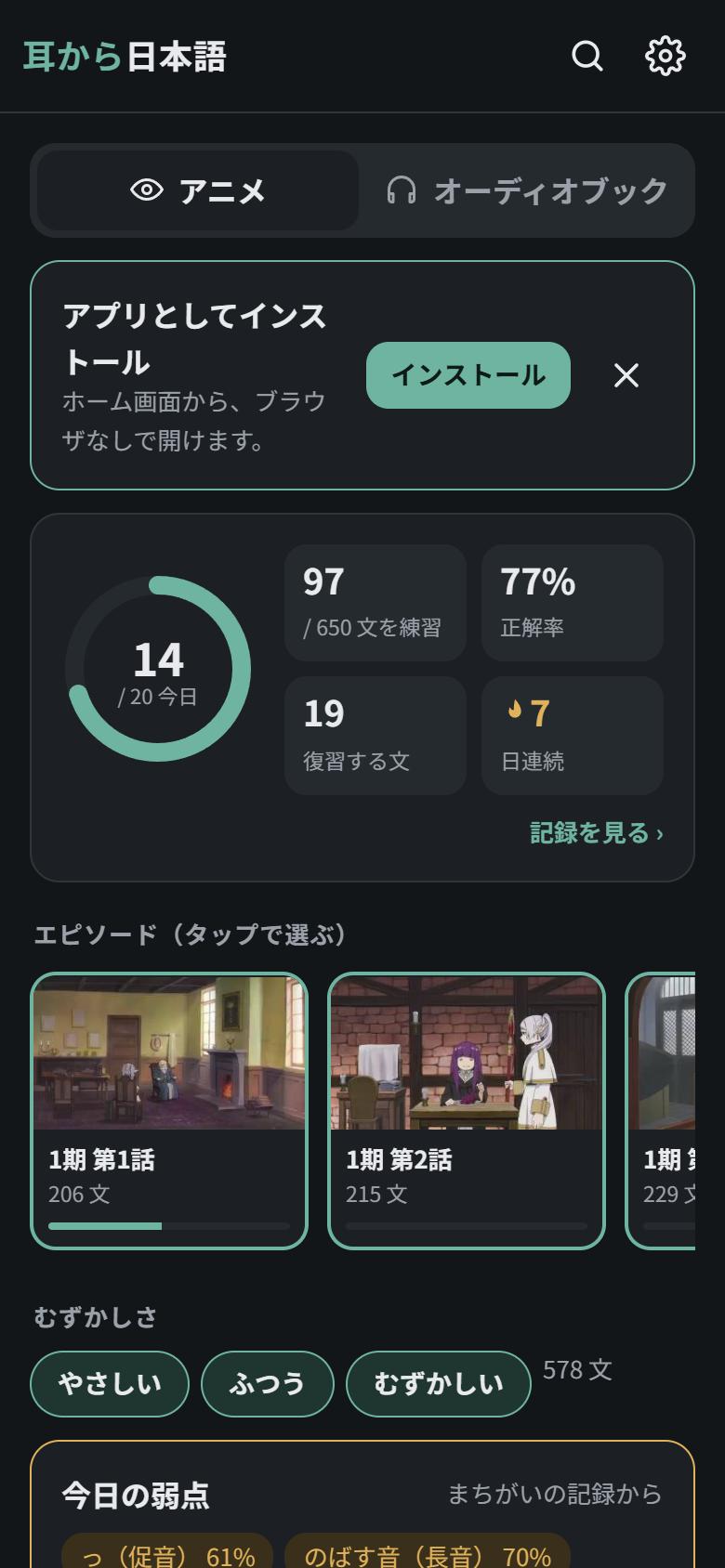
Home screen
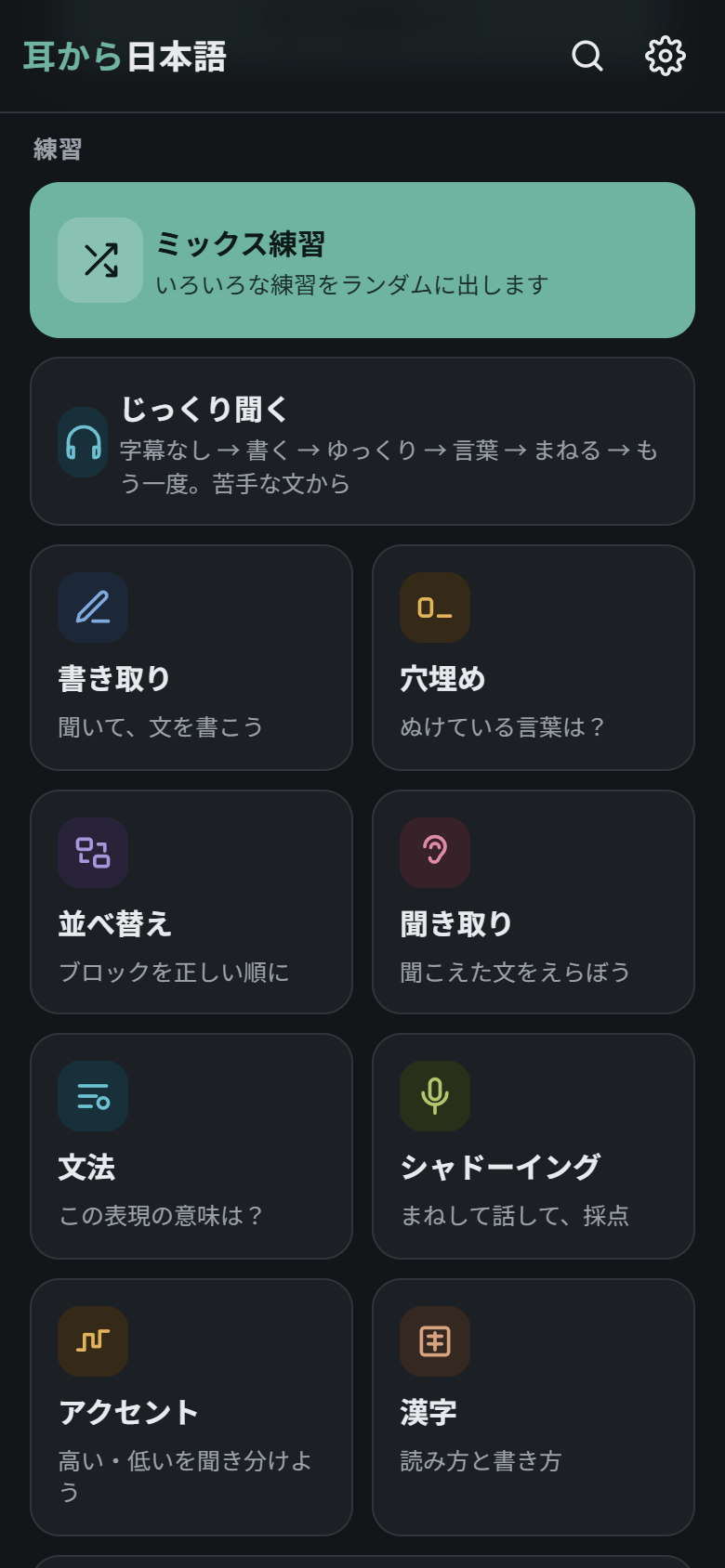
- Anime / Audiobook tabs (アニメ / オーディオブック). Each tab has its own episodes, drills and stats.
- Today’s progress. A ring shows today’s answers against your daily goal, next to the number of sentences practised, your accuracy, the sentences due for review and your day streak (日連続). Tap the card to open the progress screen.
- Difficulty filter (むずかしさ: easy / normal / hard). The script gives each sentence a difficulty level. The number on the right is how many sentences match your filters.
- Today’s weak points (今日の弱点). Once the app has seen you make mistakes, a card lists what you get wrong most (a kind of sound, a pitch pattern, grammar patterns, words and lines), and 弱点を練習する starts a round built from exactly those. See Today’s weak points.
- Search (🔍, top right) and Practice (練習) and Learn (学ぶ), described below.
Episodes and importing
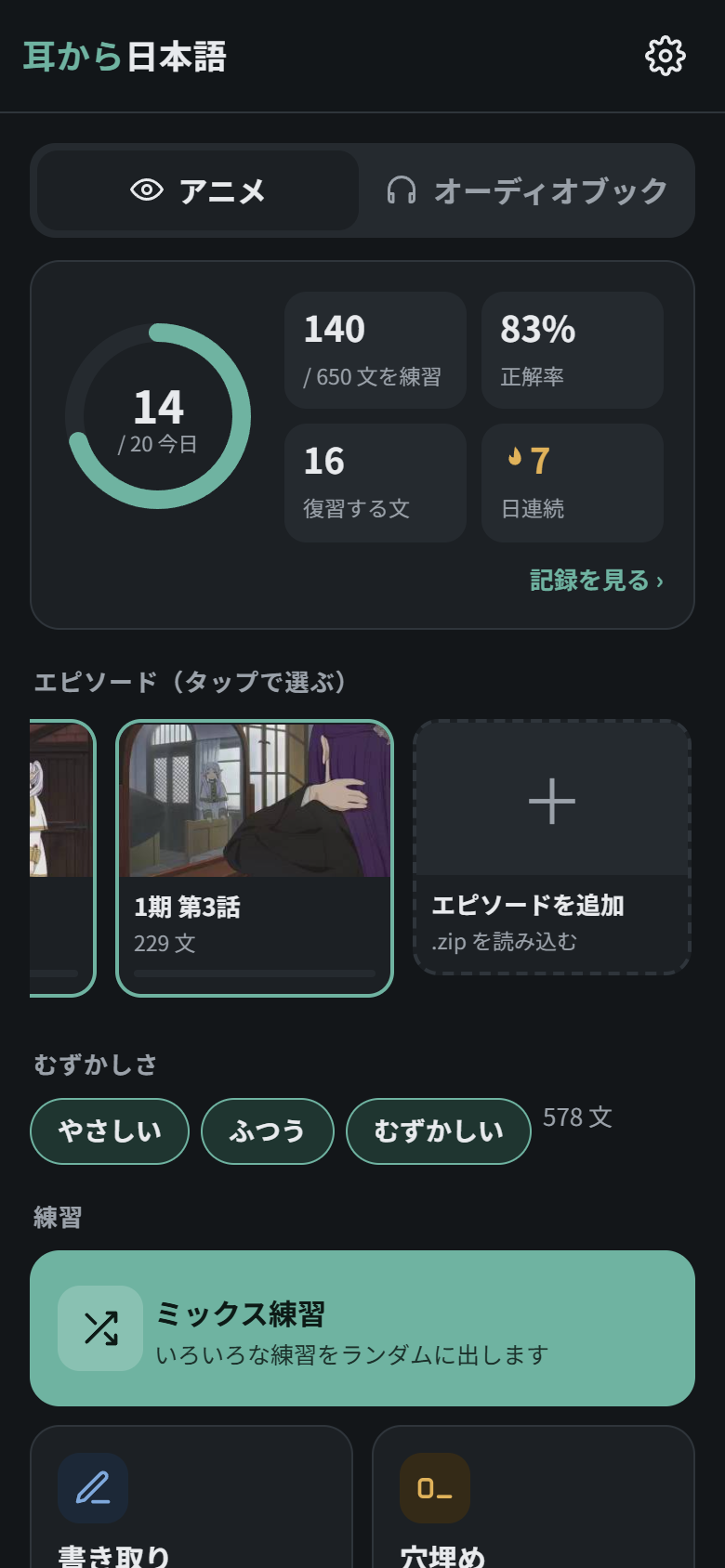
- Each episode card shows a frame from the episode, the number of sentences and how much you have practised.
- Tap an episode to include or exclude it from the drills; excluded episodes are dimmed.
- The last card, + エピソードを追加 (“add episode”), imports new
.zippacks, and you can pick several at once. See Import the packs.
Practice drills (練習)
Every drill plays the real clip of the line. You can replay it (もう一度), change the speed (the button with the current speed, such as 1×: 0.5×, 0.65×, 0.75×, 0.85×, 1×, 1.1× or 1.25×), or hide the video and keep only the audio (映像). 自動 (automatic) picks the speed from your progress on each line: 0.75× for lines you can’t catch yet, 0.85× once you have got them right, and full speed once you know them well, so each line speeds up as you learn it. Each round has as many questions as you set in settings (10 by default).
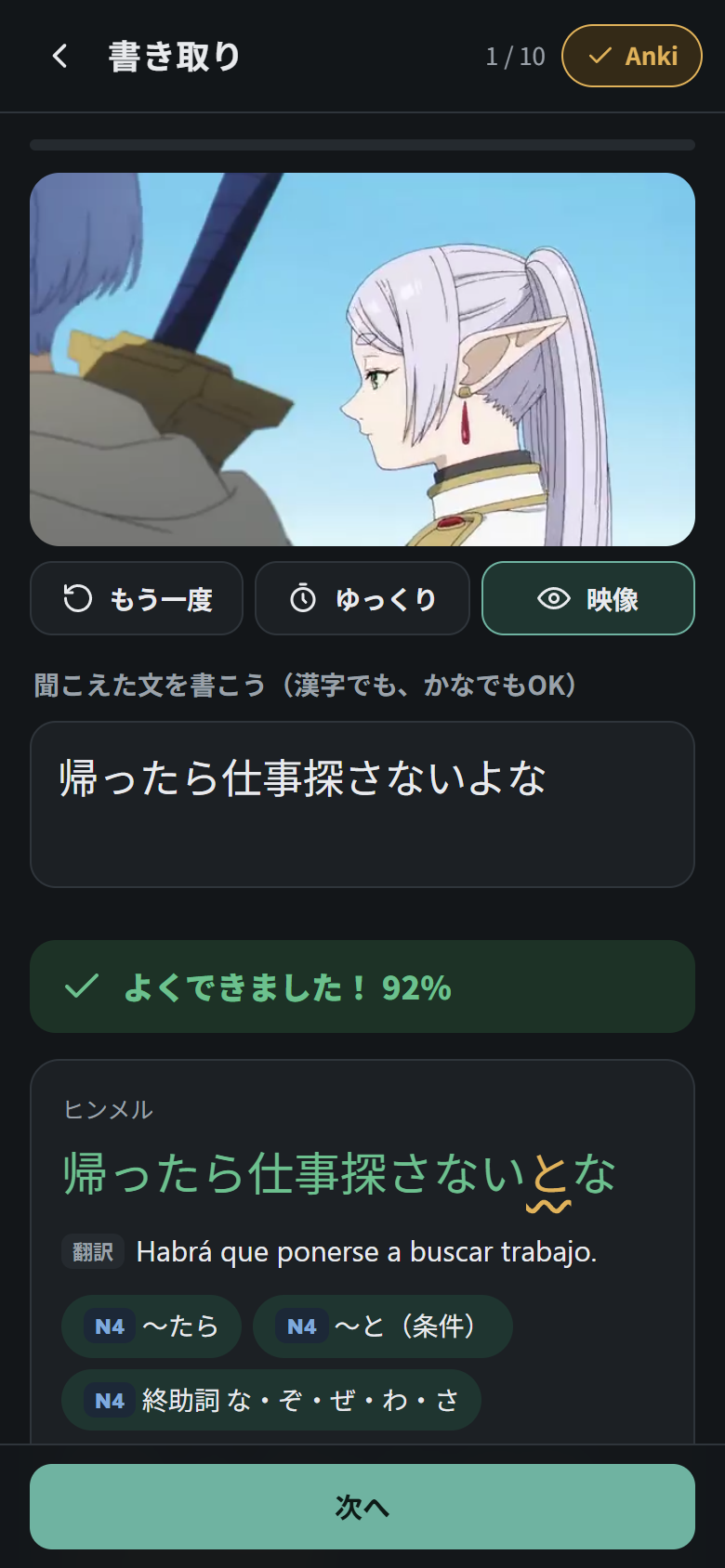
After each answer the full line is shown, with the speaker, the translation, the grammar patterns and their JLPT level. Tap any word to see its meaning, and any grammar chip for an explanation.
[!TIP] + Anki in the top-right corner of every drill saves the current line for Anki, even before you answer.
[!NOTE] Spaced repetition. Sentences and words you get right come back later and later, up to 120 days. Mistakes come back after 10 minutes. Sentences that are due, or that you often get wrong, are picked more often.
Mixed practice (ミックス練習)
A random mix of the sentence drills below (everything except word cards), weighted towards dictation and grammar. It is the big button at the top of 練習.
Dictation (書き取り)
Listen and type the line in kanji or kana, either is accepted. You get a score, and each word is coloured green (right), orange (close) or red (wrong). There are three hints (ヒント): the length and first kana, then a ○○○ outline of the sentence, then the translation.
Fill in the blank (穴埋め)
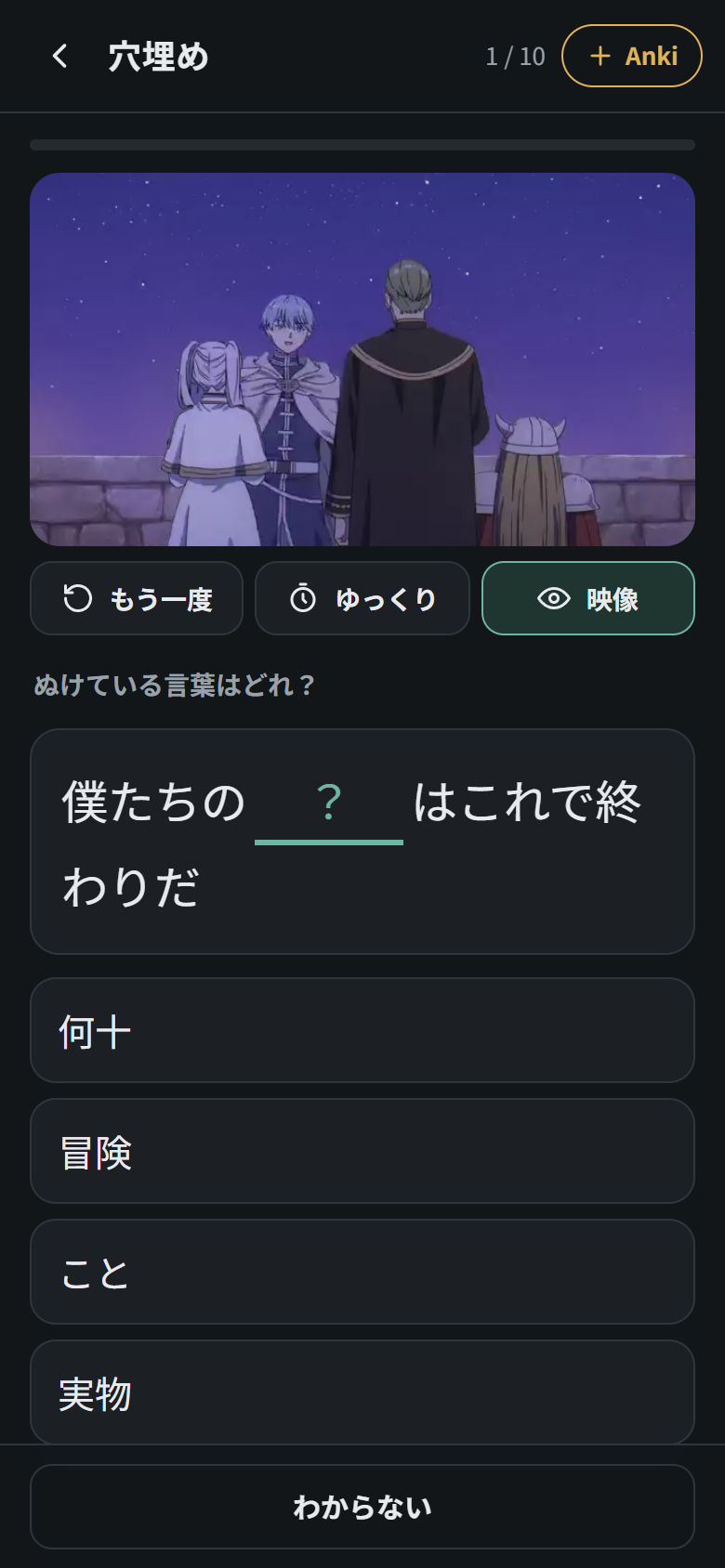
One content word is missing; pick it from four options. Words you have not marked as known come up first.
Sentence order (並べ替え)
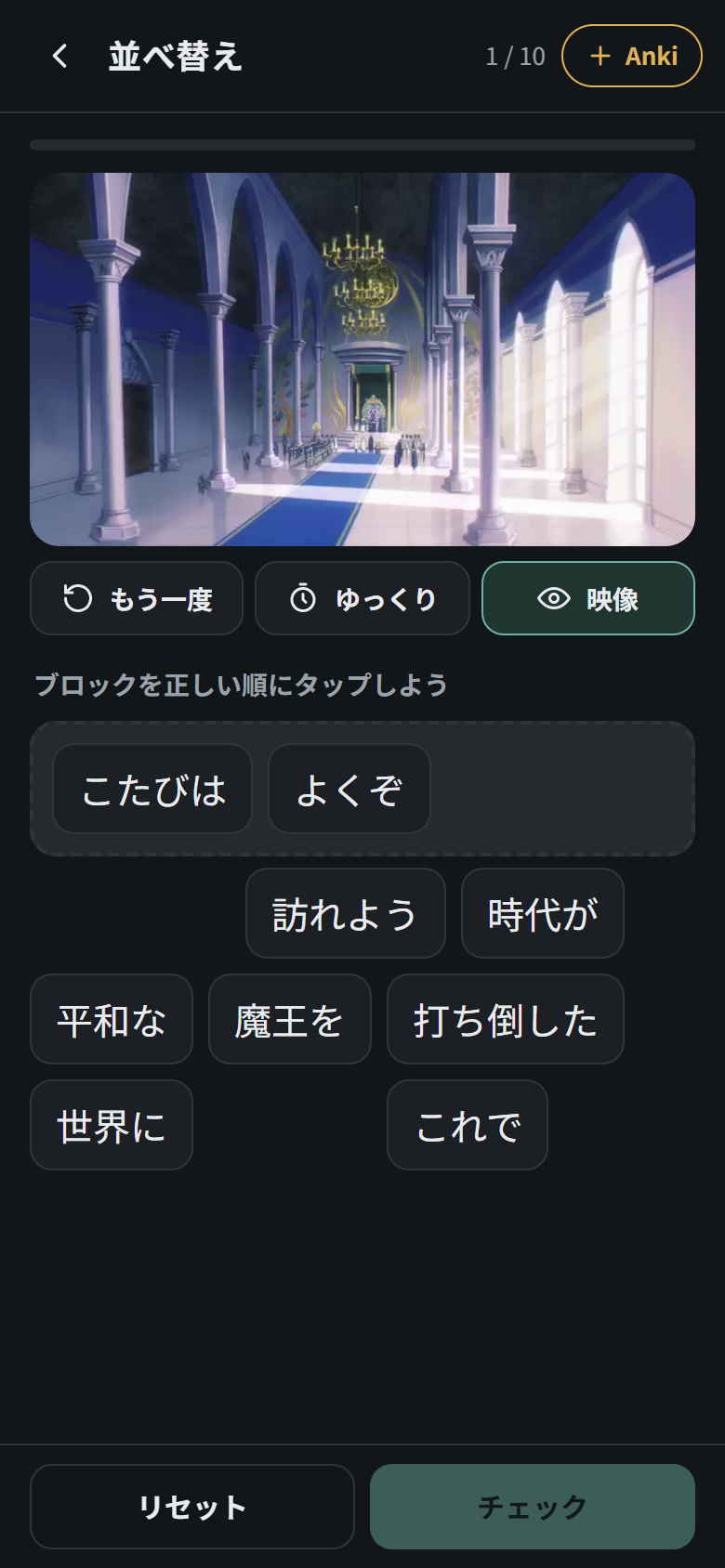
Tap the phrase blocks in the right order. Tap a block in the answer to put it back, or リセット to start again.
Listening (聞き取り)
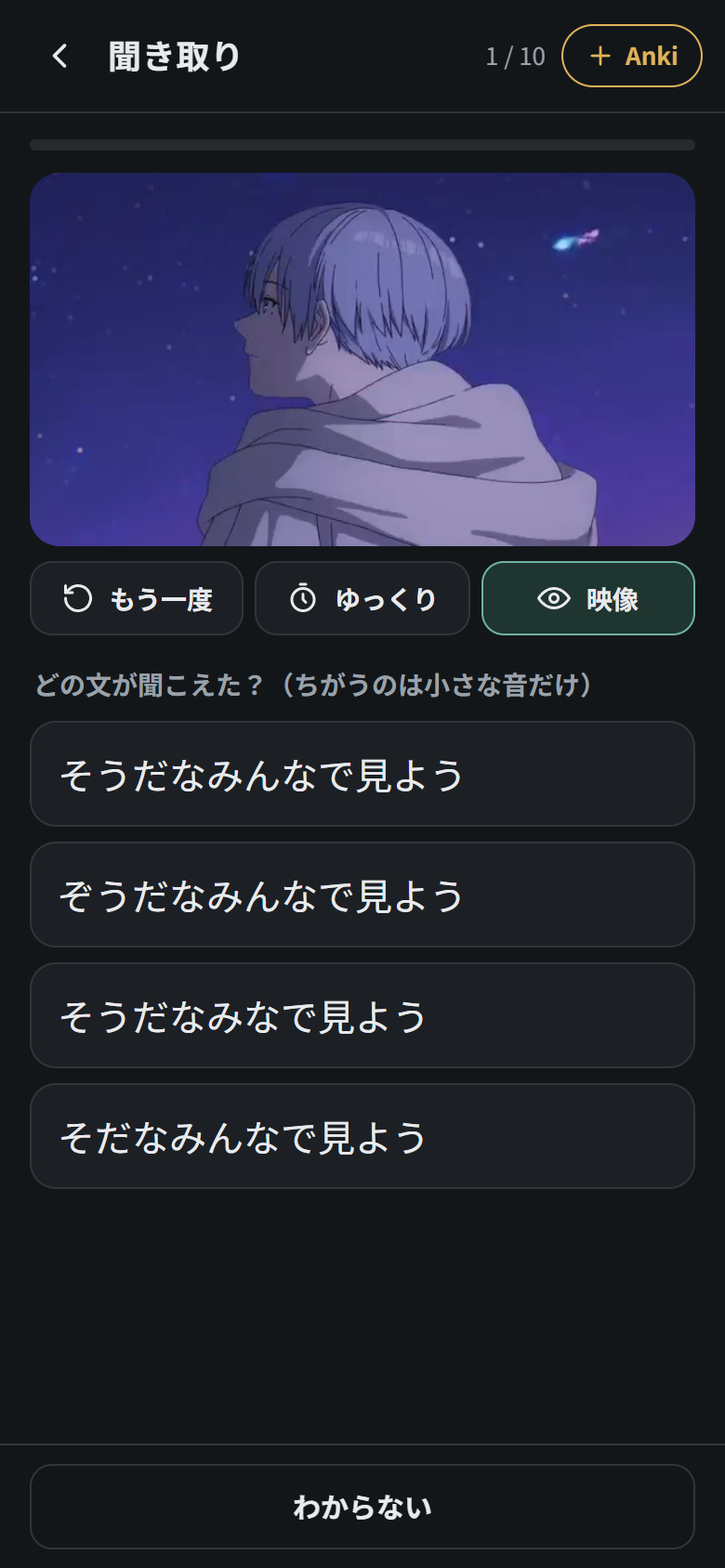
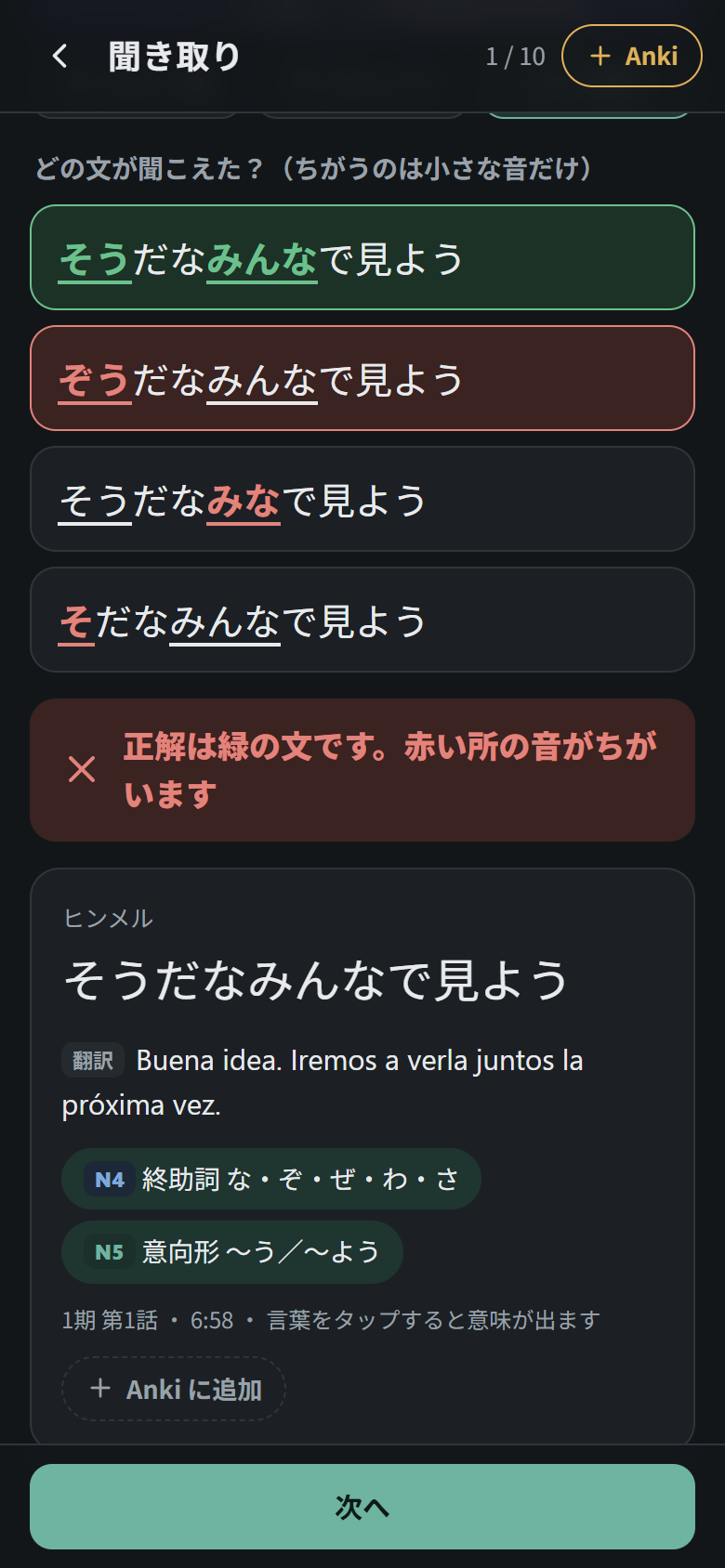
Choose which of four sentences you heard. All four are the same sentence with one small sound changed: a small っ added or dropped (いった / いた), a long vowel stretched or cut (おばさん / おばあさん), a ゛ added or removed (きょう / ぎょう), ゃゅょ made big (びょういん / びよういん) or an ん dropped. The words that change are written in kana in every option, so the spelling gives nothing away, and real words are preferred as traps. After you answer, the sound that differed is underlined in each option. Sentences with no word that can be changed this way fall back to four different sentences of similar length.
Grammar (文法)
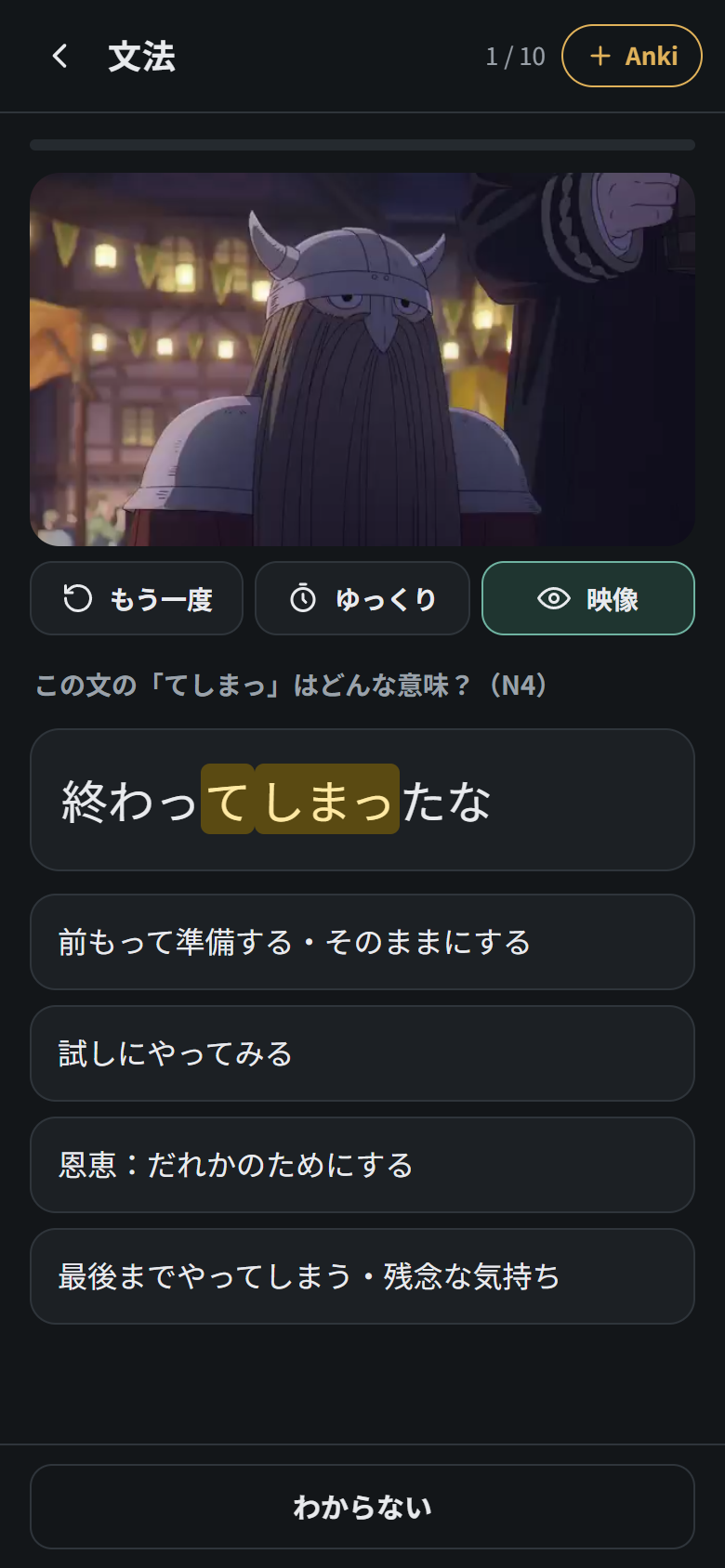
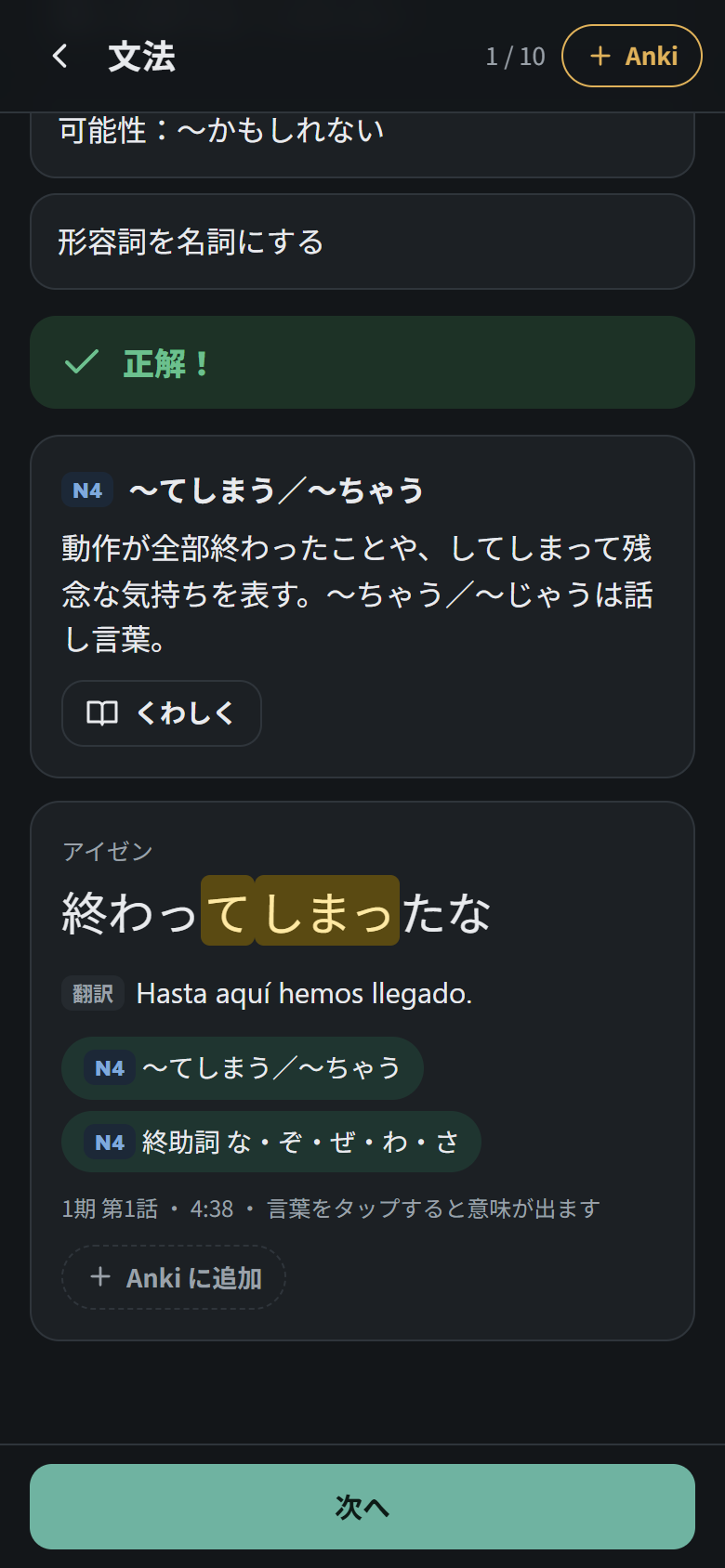
A grammar pattern is highlighted in the line; choose what it means. After answering you get a short explanation, and くわしく opens the full grammar page. Only the JLPT levels enabled in Settings are asked.
Shadowing (シャドーイング)
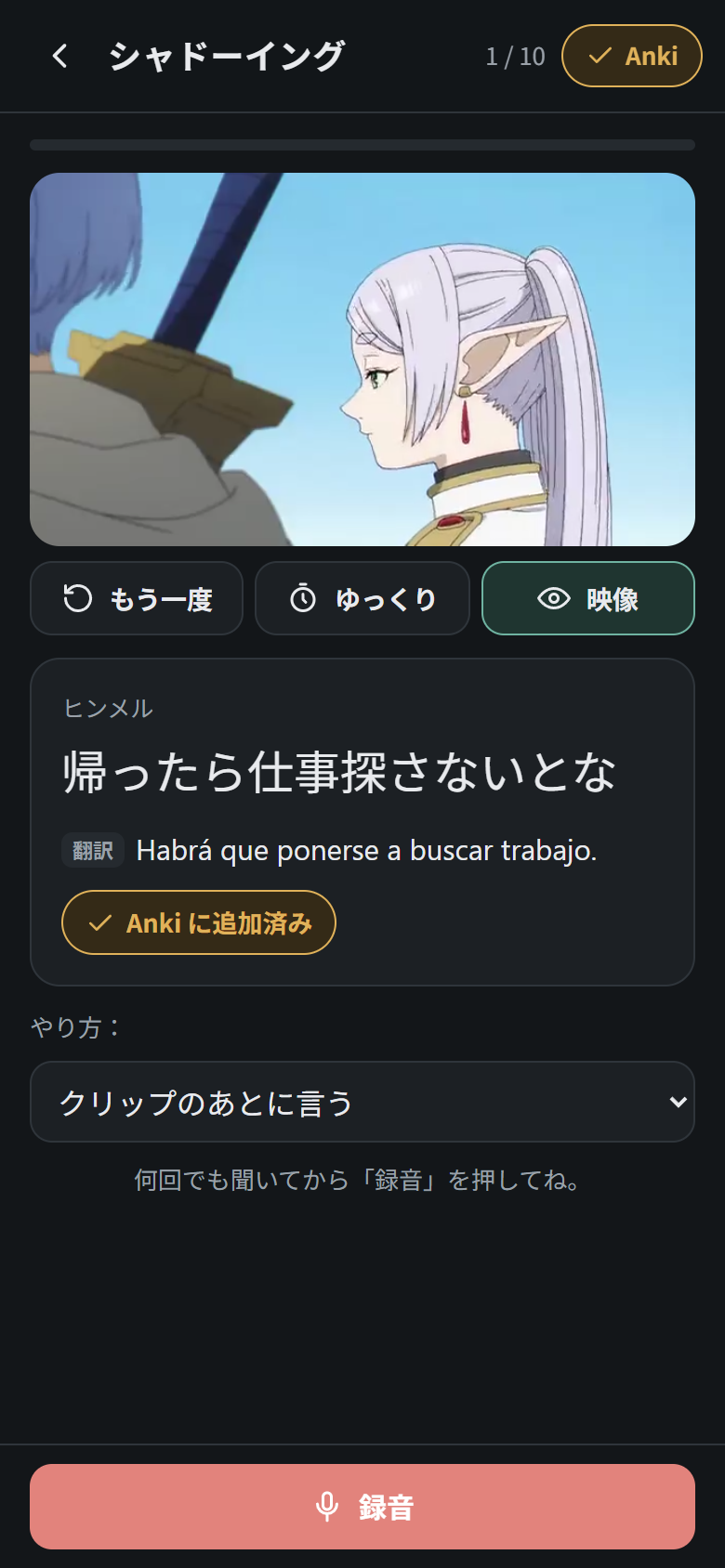
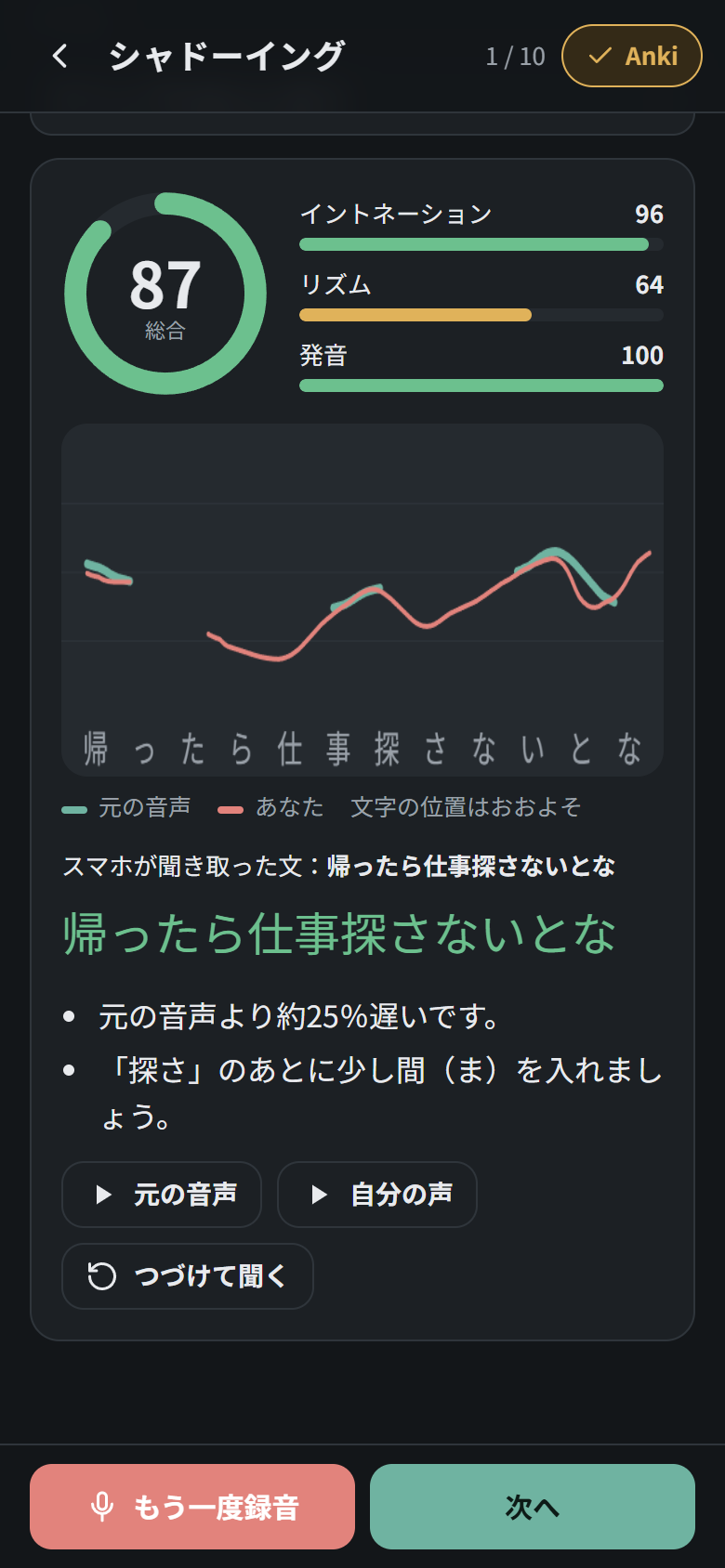
Record yourself repeating the line, either after the clip (クリップのあとに言う) or together with it (クリップといっしょに言う, earphones recommended). Then you get:
- Scores for intonation (イントネーション), rhythm (リズム) and pronunciation (発音), and an overall score.
- A pitch graph: the character’s intonation in green and yours in red, over the sentence, so you can see where your voice goes up or down differently.
- What the phone heard, with each word coloured green, orange or red.
- Tips, for example if you were much slower or faster than the original, or where to leave a short pause.
- Buttons to play the original (元の音声), your recording (自分の声), or both one after the other (つづけて聞く), and もう一度録音 to try again.
[!IMPORTANT] The microphone only works when the app is opened over HTTPS (or on
localhost). The pronunciation score uses the browser’s speech recognition, so it also needs an internet connection.
Pitch accent (アクセント)
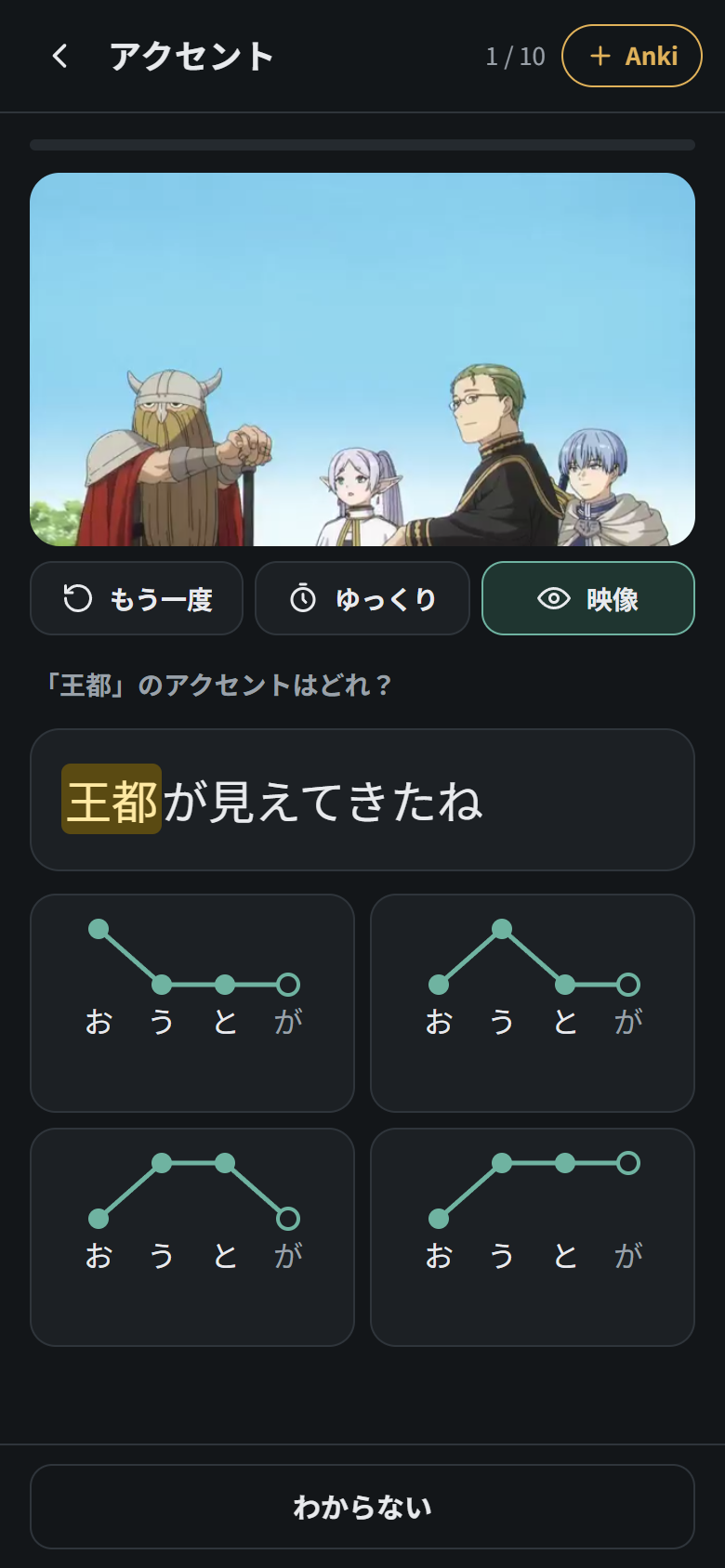
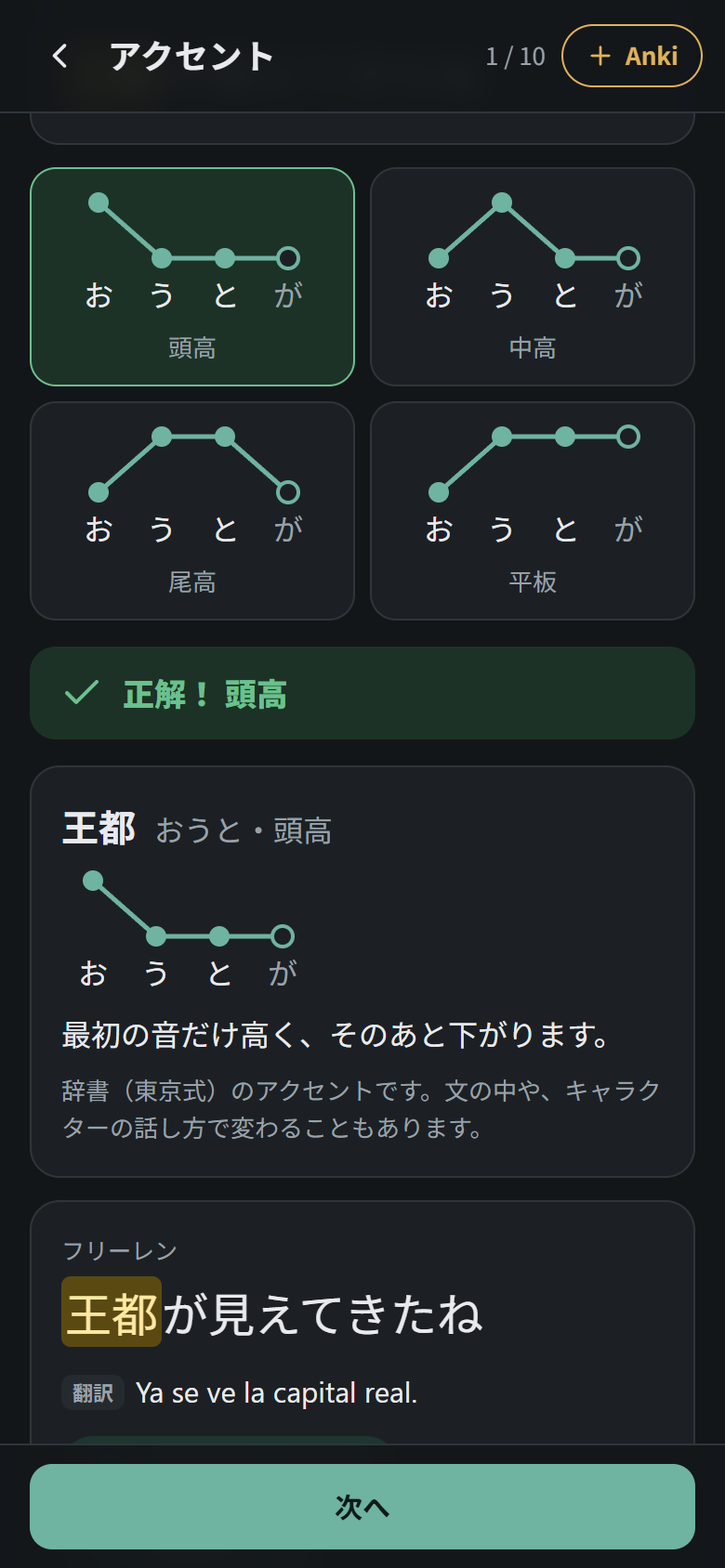
Listen to a line and choose the pitch pattern of the highlighted noun: 平板 (flat), 頭高 (high first), 中高 (drops in the middle) or 尾高 (drops on the particle after it). Each option is drawn as high and low dots over the kana, with a hollow dot for a following が. After you answer you get the correct pattern, what it means, and other words in your episodes with the same reading but a different accent (橋 / 箸 / 端), which the drill picks more often.
The accents are the Tokyo-standard ones from UniDic, or from your pitch-accent dictionary if you add your Yomitan dictionaries (which also gives alternative accents, such as 旅 [2] and [1]). They are stored in the pack when it is created, so packs made before this drill existed need to be created again (--rehacer). Real speech can differ a little: compound words, sentence intonation and how a character talks all bend the dictionary pattern. The same pitch diagram also appears in word details.
Kanji (漢字)
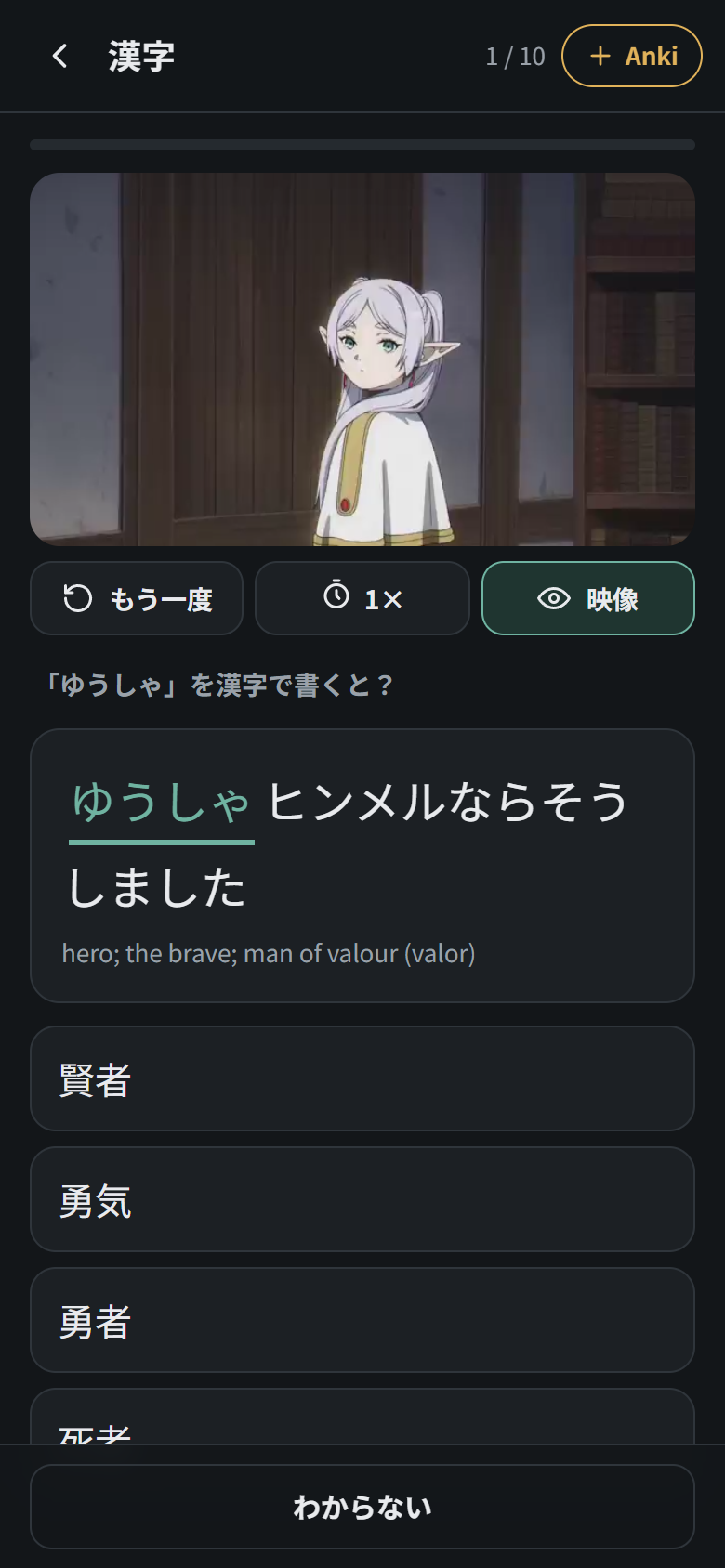
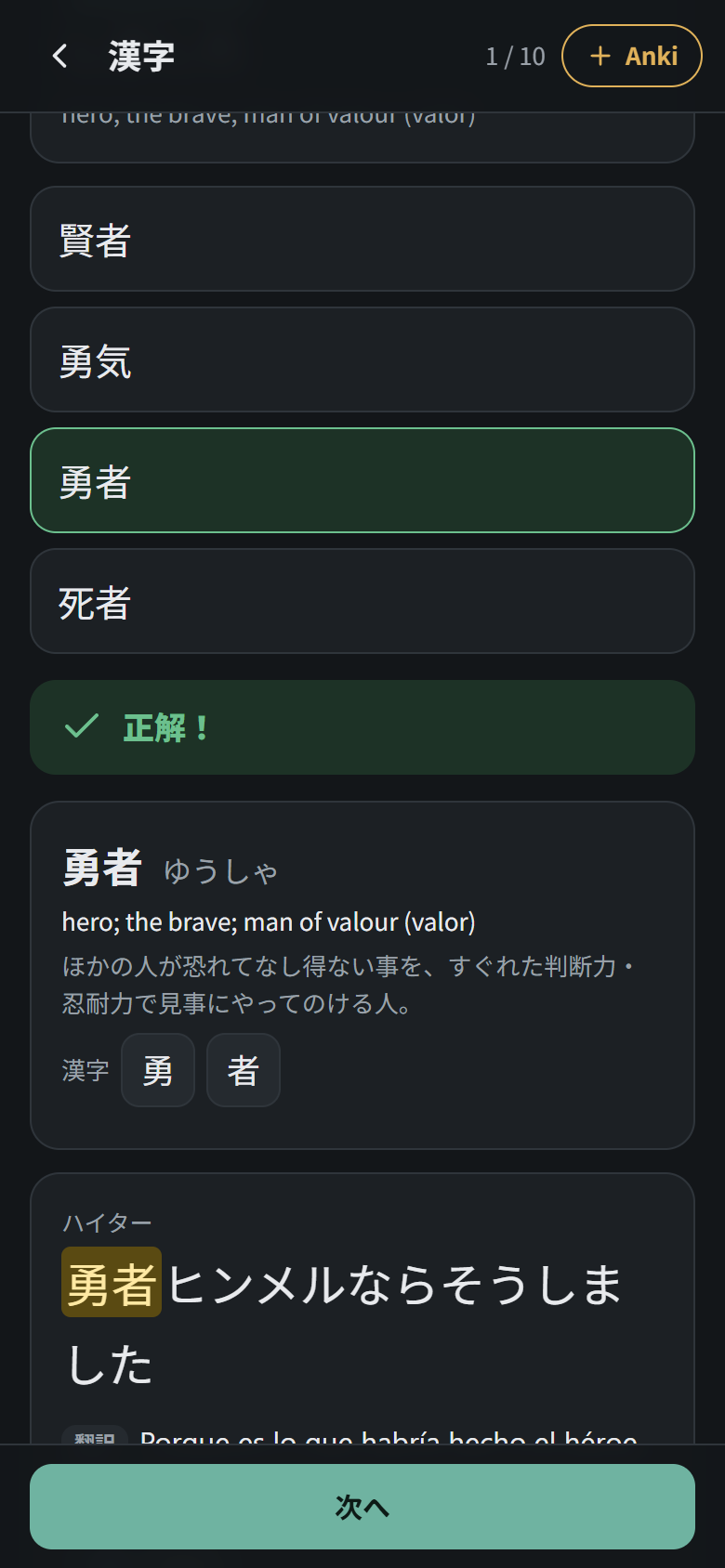
Kanji practised through words you actually heard, never in isolation. Each question takes a word from the line and asks either for its reading (「勇者」の読み方は?) or for the word in kanji from its reading (「ゆうしゃ」を漢字で書くと?, with the word blanked out of the sentence). The wrong options are chosen to be tricky: words that share a kanji (賢者, 勇気), readings that differ by one small sound (ゆしゃ, ゆうっしゃ), and homophones. After you answer, the word’s meaning, its Japanese definition and its kanji appear; tap a kanji to open its kanji sheet.
Step by step (じっくり聞く)
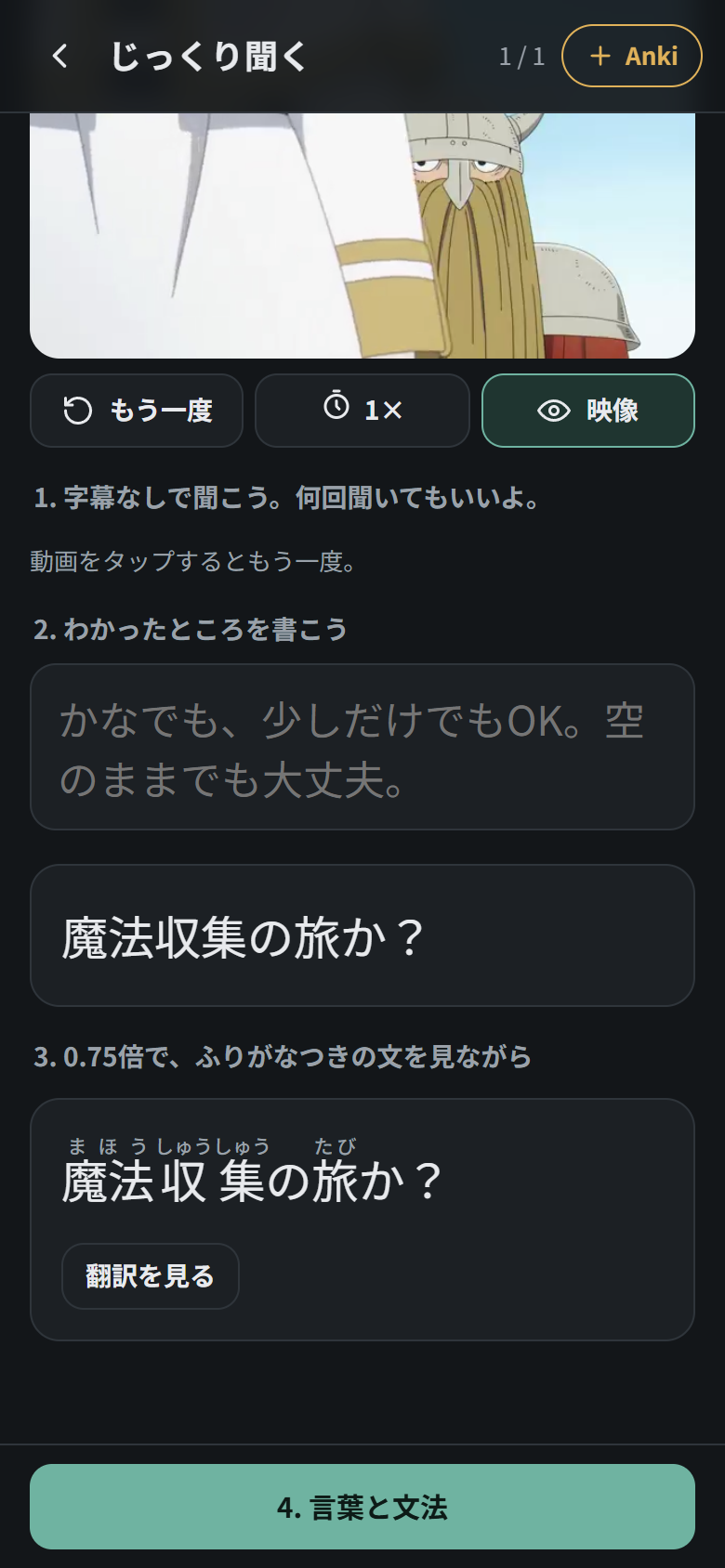
For lines you just can’t understand. One line, six steps:
- 聞く: listen with no text, as many times as you like.
- 書く: write what you caught (a little, in kana, or nothing at all). It is checked like dictation.
- ゆっくり: listen at 0.75× while reading the line with furigana, with the translation one tap away.
- 言葉: the words (reading, pitch pattern, meaning) and grammar of the line, each one tappable.
- まねる: shadow it.
- もう一度: listen again at full speed with no text, and say how much you understood (ぜんぶ / だいたい / まだ).
じっくり聞く on the home screen runs 3 lines, favouring the ones you fail. You can also open it for any line with the じっくり聞く button under its result.
Today’s weak points (今日の弱点)
The drills record what you get wrong: which kind of sound in listening, which pitch pattern, which grammar patterns, which words (in dictation, fill in the blank, kanji and word cards) and which lines. The 今日の弱点 card on the home screen shows the worst of them, and 弱点を練習する builds a round of up to 13 questions aimed at them:
- fill in the blank or kanji questions on your weak words,
- grammar questions on your weak patterns,
- listening questions that change your weakest kind of sound (for example, more っ if you miss those),
- pitch questions on your weakest pattern,
- shadowing and dictation of the lines you keep failing.
Word cards (単語カード)
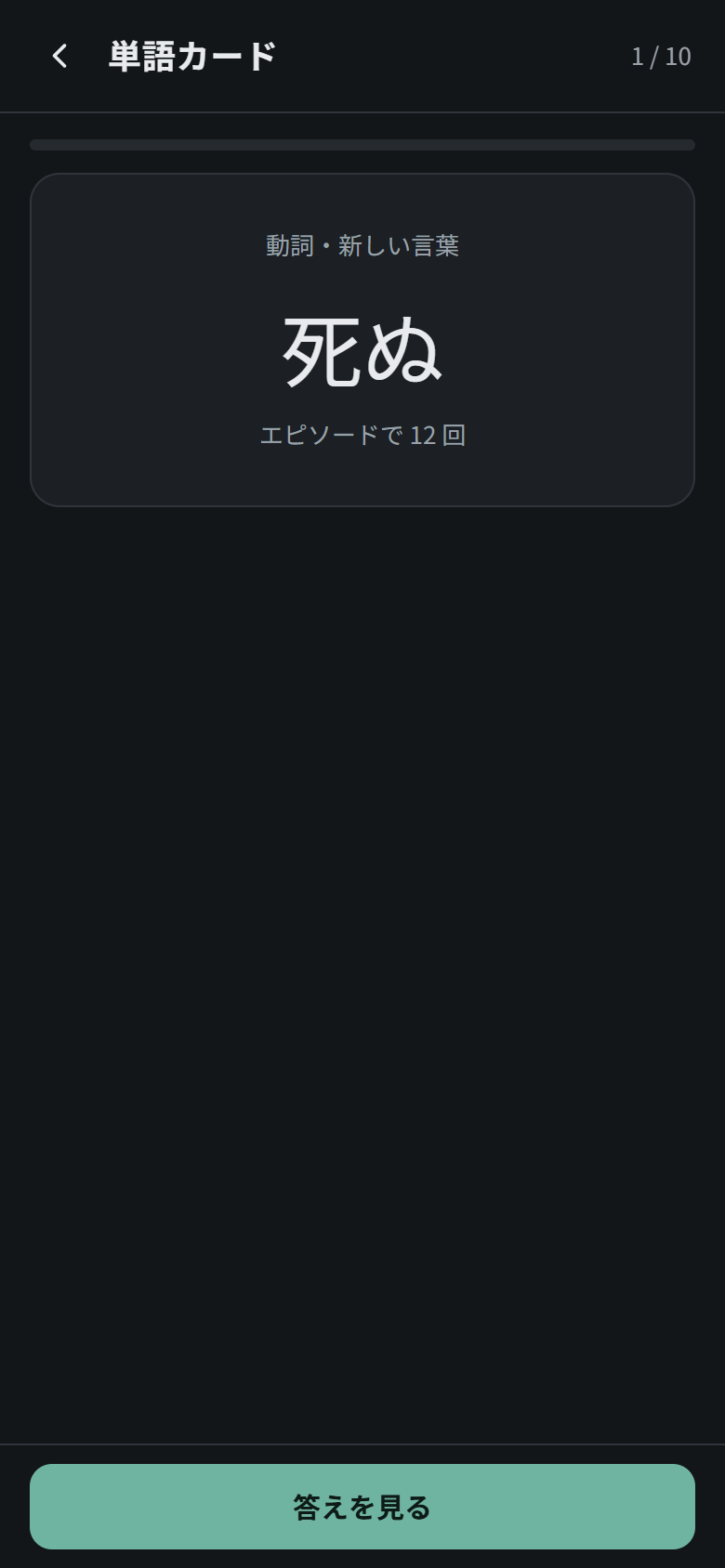
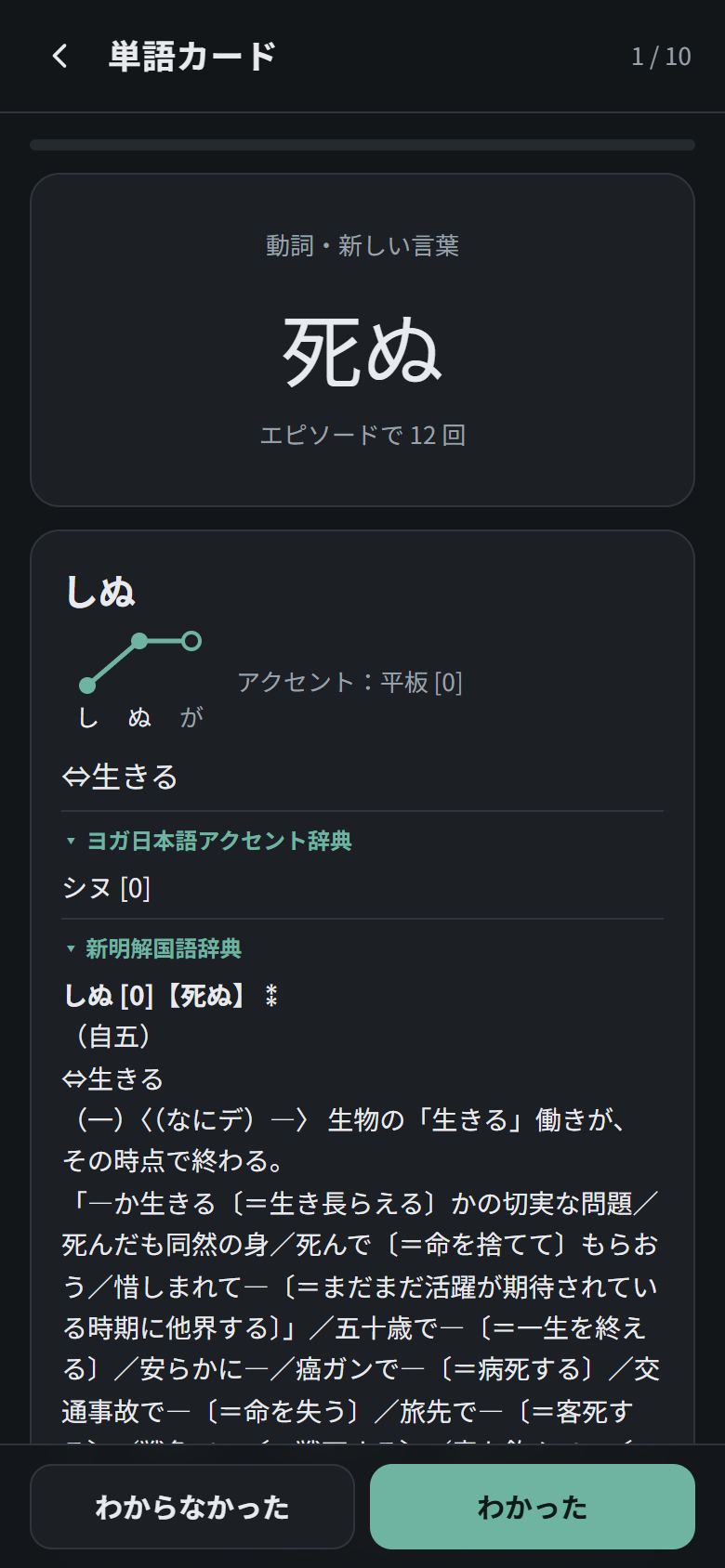
Vocabulary flashcards made from the words in your episodes, most frequent first. See the word, tap 答えを見る to reveal the reading, meanings and a real line from the anime where it appears (with its clip), then choose knew it (わかった) or didn’t (わからなかった). ✓ 覚えた marks the word as known so it never comes back. The home screen shows how many words are due today.
Round summary (結果)
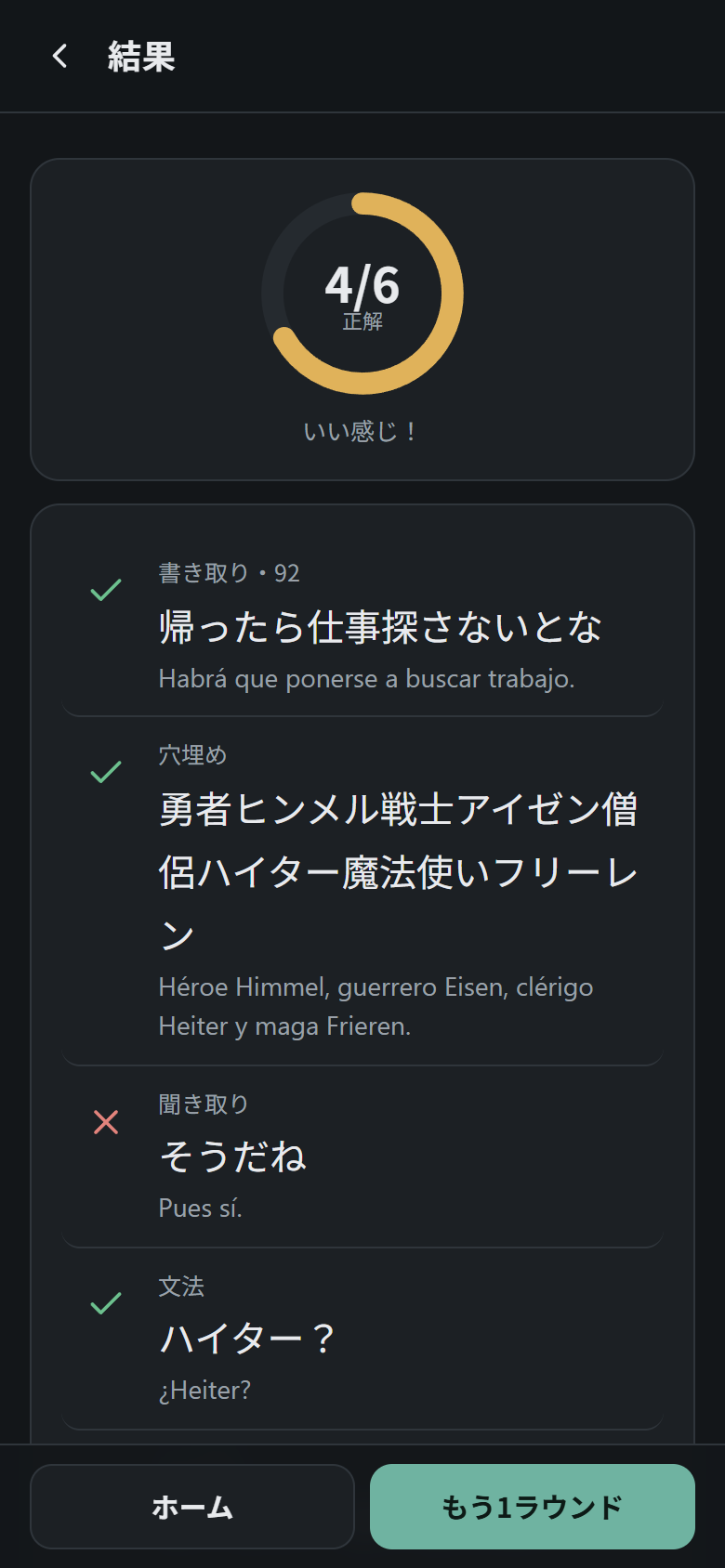
At the end of each round: your score and every line you practised, with ✓, ✗ or ― (close). もう1ラウンド starts another round.
Watch whole episodes (エピソードを通して見る)
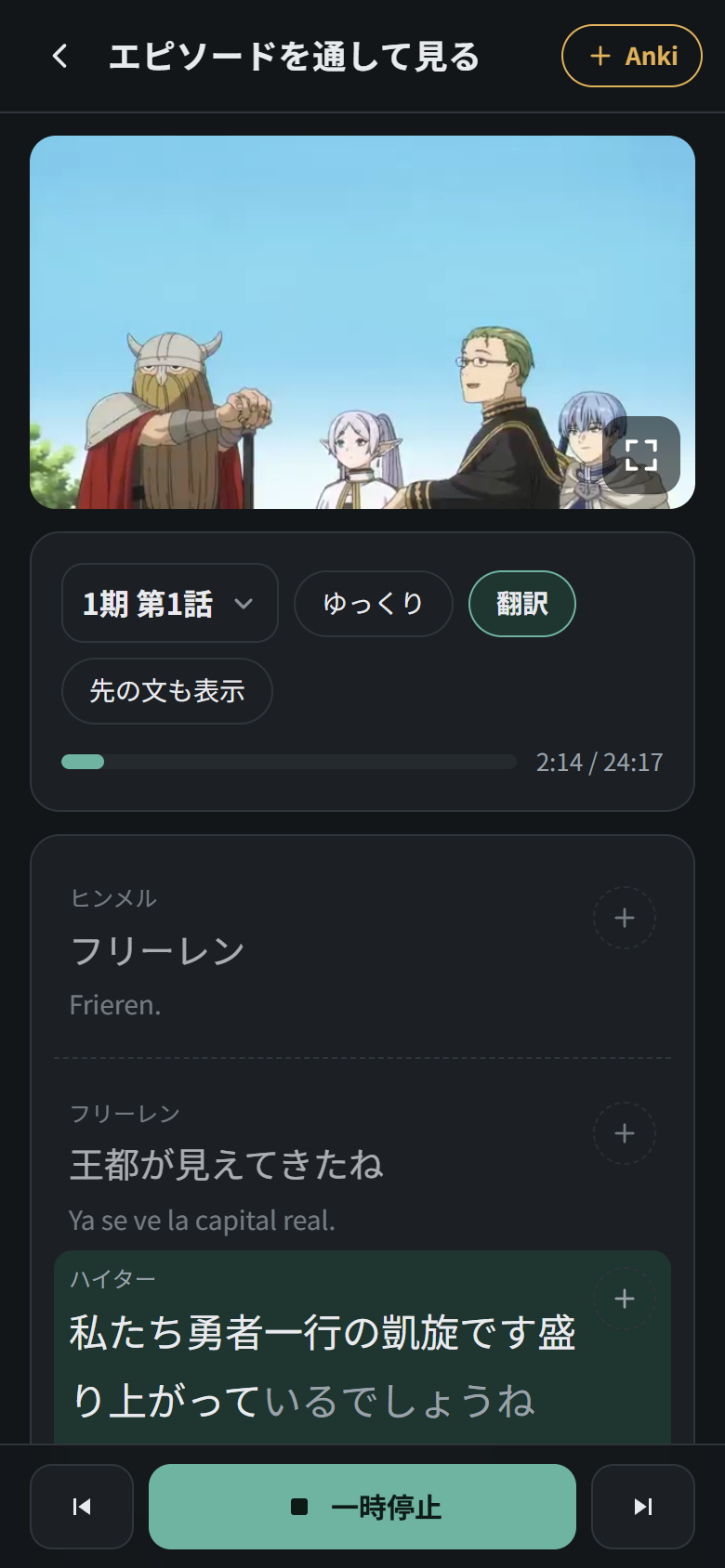
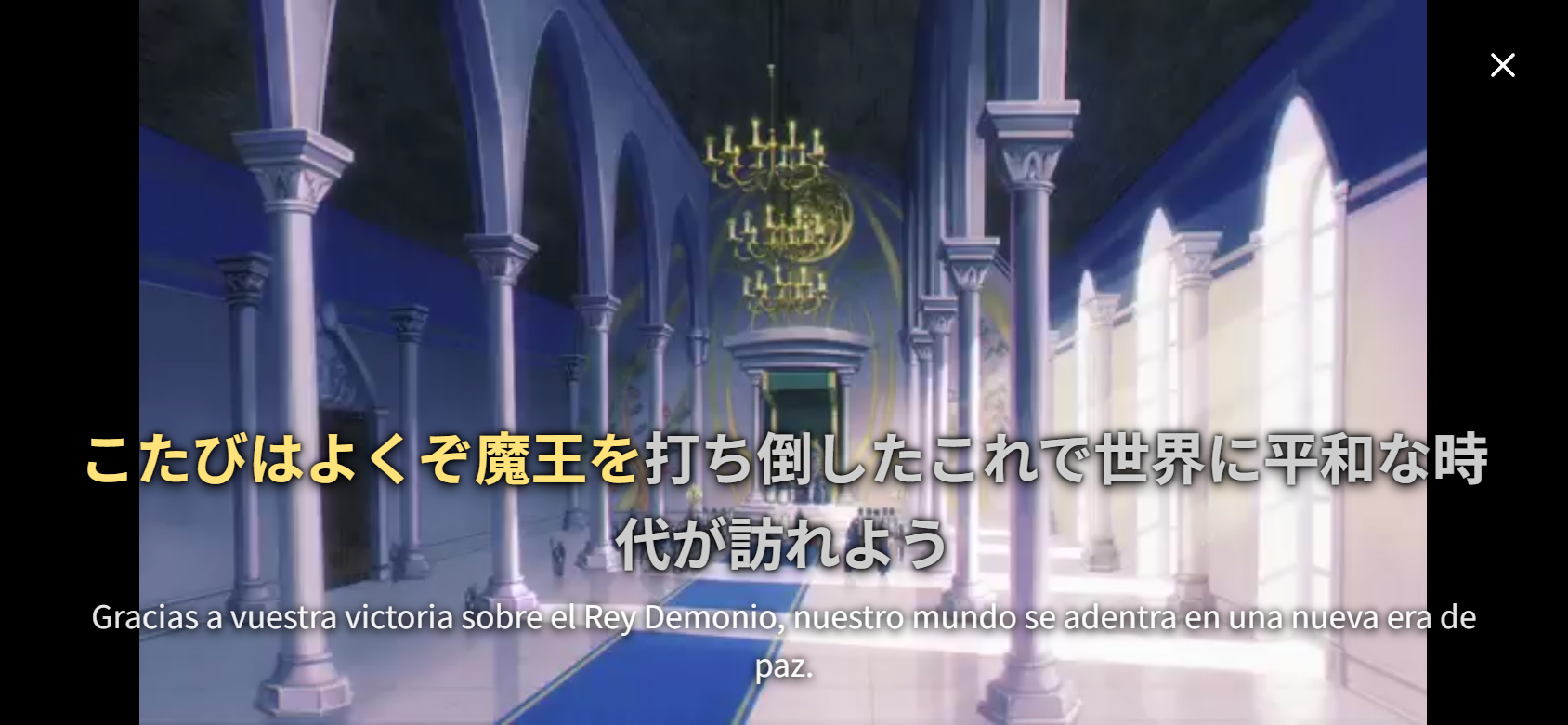
The wide エピソードを通して見る button on the アニメ tab plays an episode from start to finish, line after line, while the transcript follows along:
- Video at the top, and below it the dialogue with who is speaking and, if you turn on 翻訳, the translation. The line being spoken fills in word by word; lines still to come are blurred until you hear them (先の文も表示 shows them).
- Video controls, like YouTube: tap the video once to show the controls (play/pause and a progress bar you can drag to any point). Double-tap the right side to jump forward 10 seconds and the left side to go back 10 seconds (with dialogue-only packs, to the next or previous line); double-tap the middle to pause or resume.
- Full screen (the ⛶ button on the video): the video turns landscape, with the current line as a karaoke-style Japanese subtitle that colours in as it is spoken, plus the translation if it is on. When the original subtitles put a line at the top of the screen (to leave room for on-screen text), it is shown at the top here too. + Anki in the corner saves the line being spoken, and ✕ goes back.
- Tap any word (in the subtitle or the transcript) to pause and open its dictionary entry, with この文を Anki に追加 to send that line to Anki. Example lines play without the episode talking over them.
- ⏮ ⏯ ⏭, the speed button, the time bar and + Anki work as in chapter listening. It remembers where you stopped and moves on to the next episode at the end.
Whole episode or dialogue only. If the pack was made with --completo (see Create episode packs), it contains the full episode as one video and the app plays it from start to finish without cuts (opening, music and action scenes included); the subtitle simply disappears while nobody is speaking. Packs made without it only have the clips, so the app plays the lines of dialogue one after another and skips everything in between. The screen tells you which of the two you are watching.
[!NOTE] The full episode adds about 30–40 MB per episode at 360p: sharp in portrait, a little soft in full screen. For full screen, make it in HD with
--completo 720(about 125 MB) or--completo 1080(about 275 MB).
Learning tools (学ぶ)
Reader (読む)
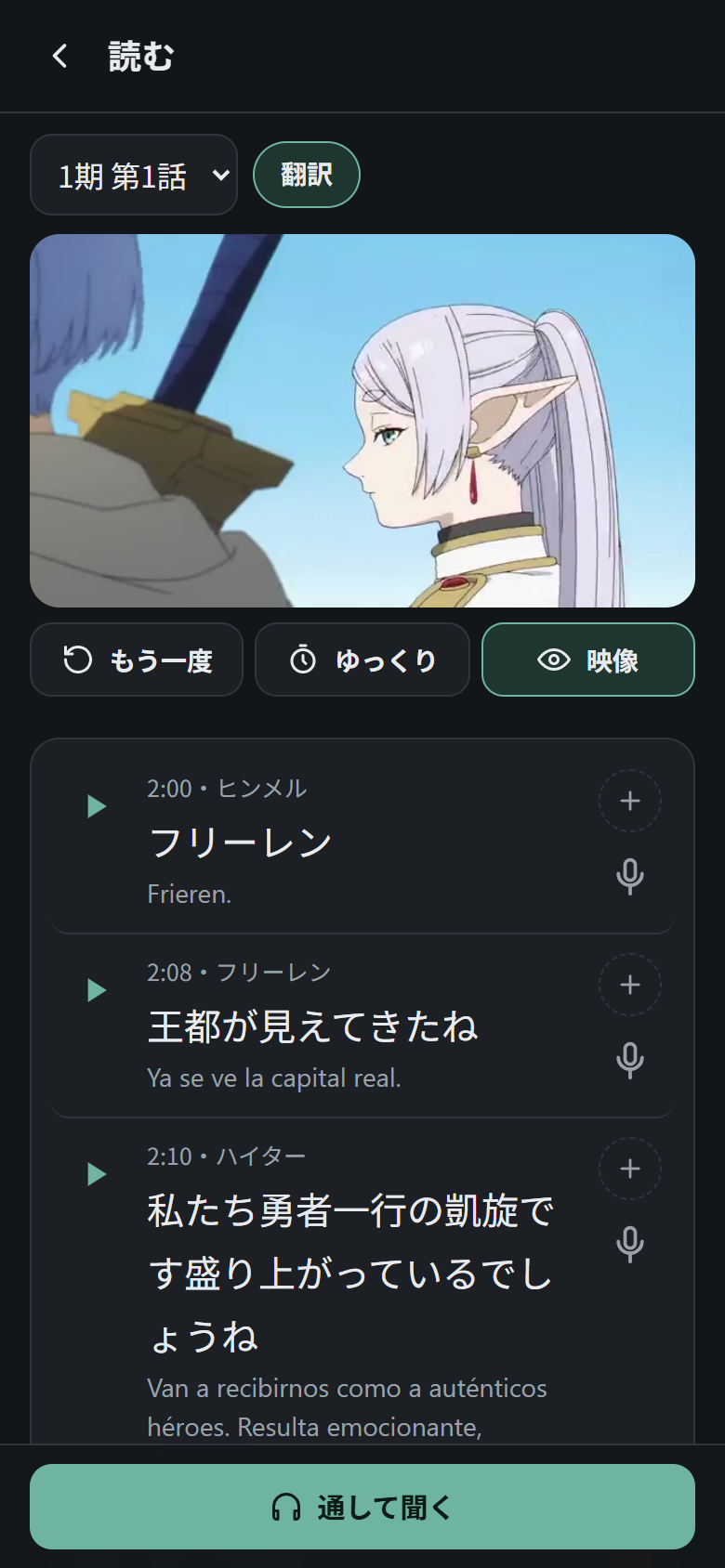
The whole episode line by line, with timestamps and speakers. Play any line, listen to the whole episode continuously (通して聞く), show or hide the translation (翻訳), send a line to Anki (+) or shadow it (🎤).
Furigana
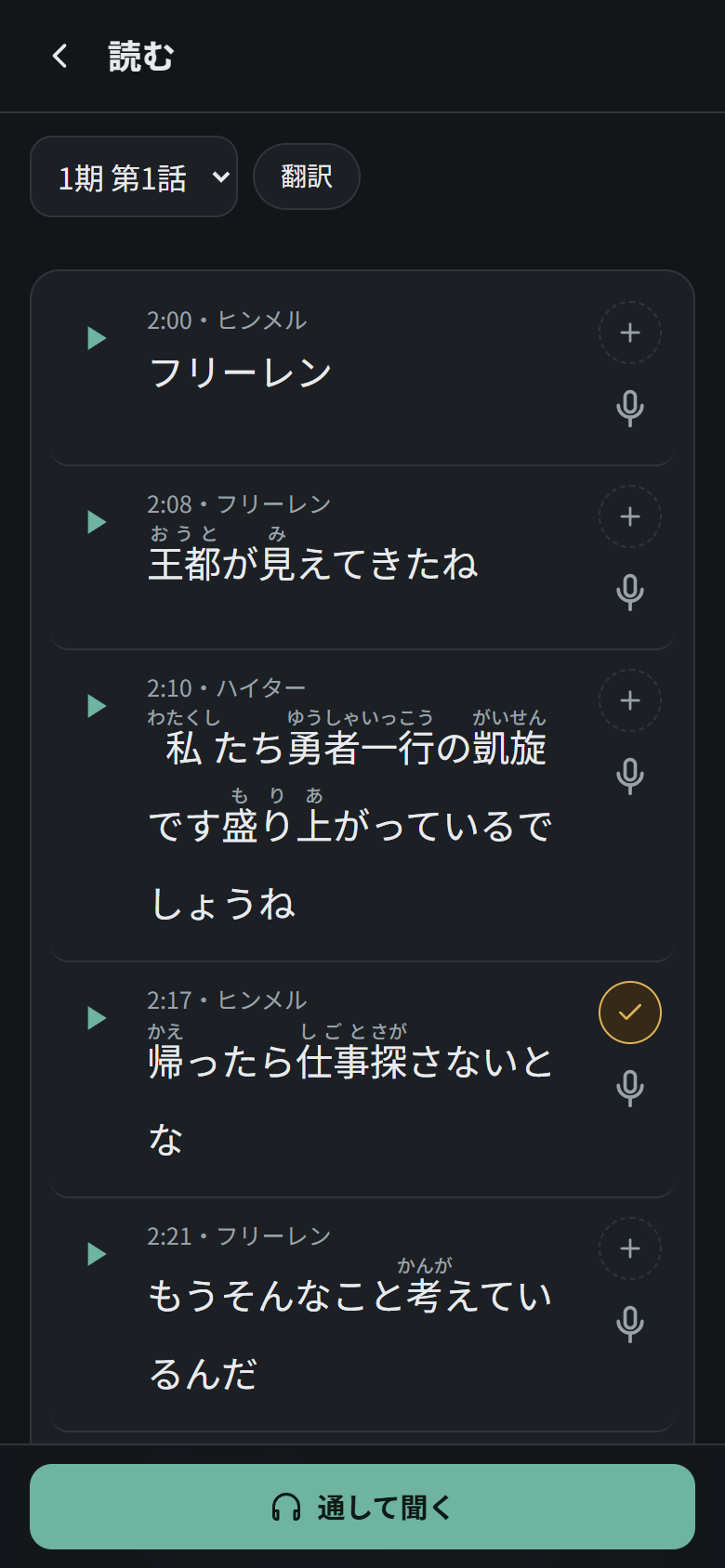
Optional, and off by default. When turned on in Settings (ふりがなを表示する), readings appear above the kanji in every sentence in the app.
Word details
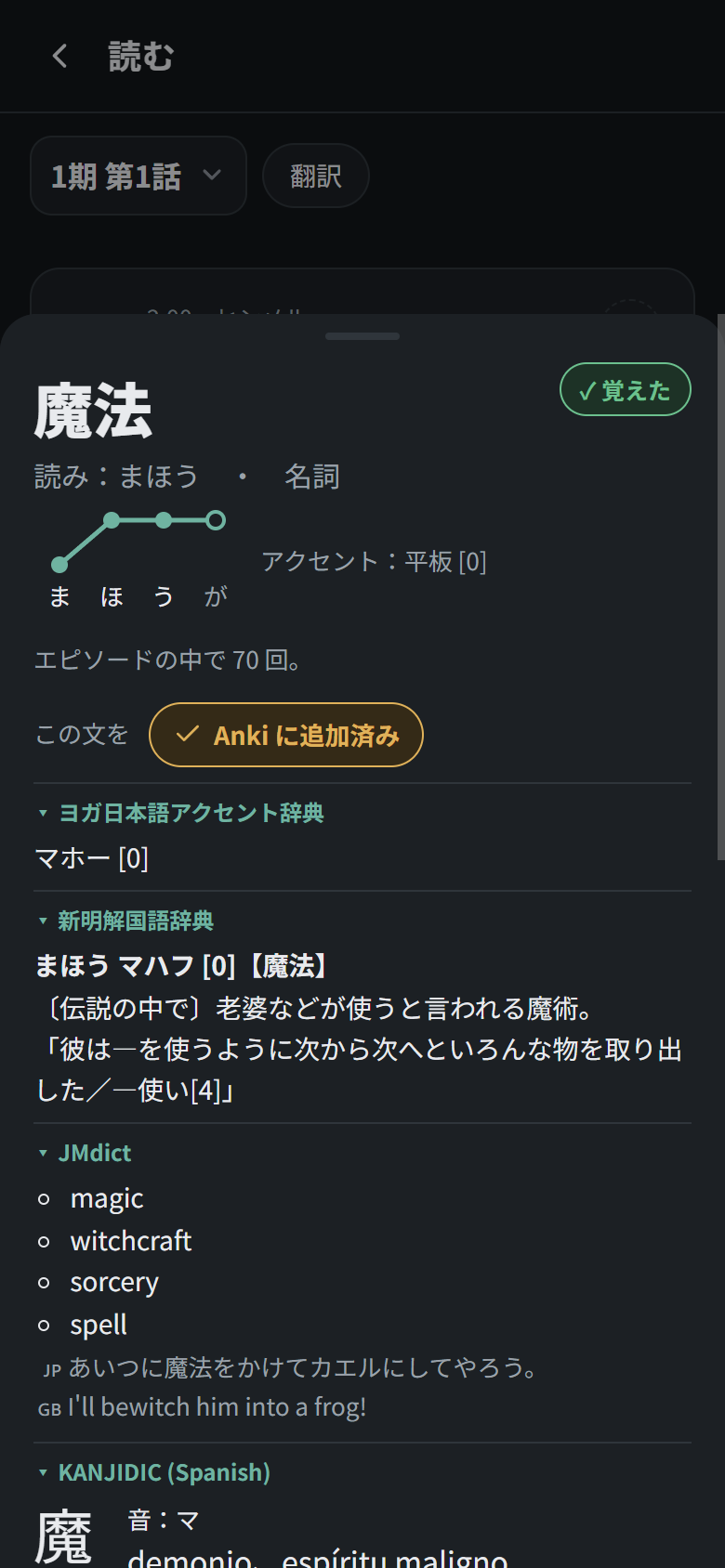
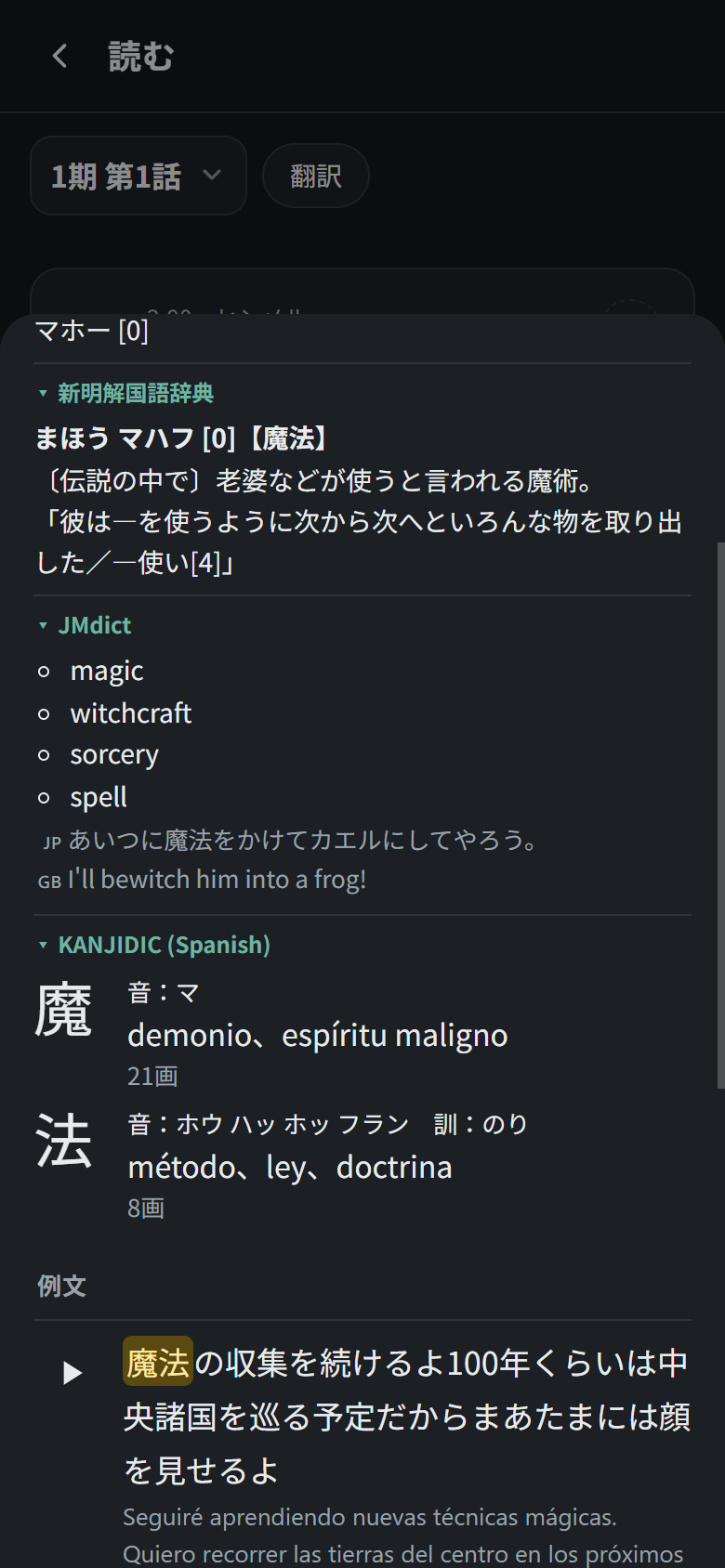
Tap any word anywhere in the app to see its dictionary form, reading, pitch accent (drawn as high and low dots), part of speech, meanings, how often it appears, and example lines with audio. 覚えた? marks it as known. The meanings come from JMdict (English), or from your own dictionaries when the pack has them.
Your own dictionaries (Yomitan)
If you use Yomitan, the packs can carry the dictionaries you already have there, in the order you choose. The screenshots above show a setup with:
- ヨガ日本語アクセント辞典: pitch accent, with alternatives (also used by the pitch-accent drill).
- 新明解国語辞典: definitions in Japanese.
- JMdict: English meanings with example sentences.
- JMnedict: readings of names (shown for names only).
- KANJIDIC: readings and meaning of every kanji in the word (in Spanish here; any language works).
Each dictionary is a section you can fold, and the app remembers the ones you folded. The same dictionaries also appear on the back of word cards, and each word on an Anki card gets its accent, a one-line Japanese definition and the meaning of its kanji.
You can add more dictionaries. Any Yomitan dictionary works:
| Kind | Examples | Shown as |
|---|---|---|
| Term dictionaries | monolingual (新明解, 大辞泉…), bilingual (JMdict in any language), slang (KireiCake) | a section with the entry |
| Kanji dictionaries | KANJIDIC in any language | readings, meanings and stroke count for each kanji |
| Frequency lists | Anime & Jdrama Freq, JPDB | 頻度:rank |
| Pitch dictionaries | Kanjium, NHK | the accent numbers, also used by the pitch drill |
To add one, install it in Yomitan, export the collection again, run python yomitan_import.py, and recreate the packs with --rehacer. The order is the ORDER list at the top of yomitan_import.py, where each entry is part of a dictionary’s title; dictionaries that match nothing go last. See Use your own Yomitan dictionaries for the step-by-step setup.
[!IMPORTANT] Many dictionaries are commercial works. They stay on your PC and in your own packs, and they are never uploaded to this repository (
.gitignoreexcludes them). Don’t share packs made with them.
Search (検索)
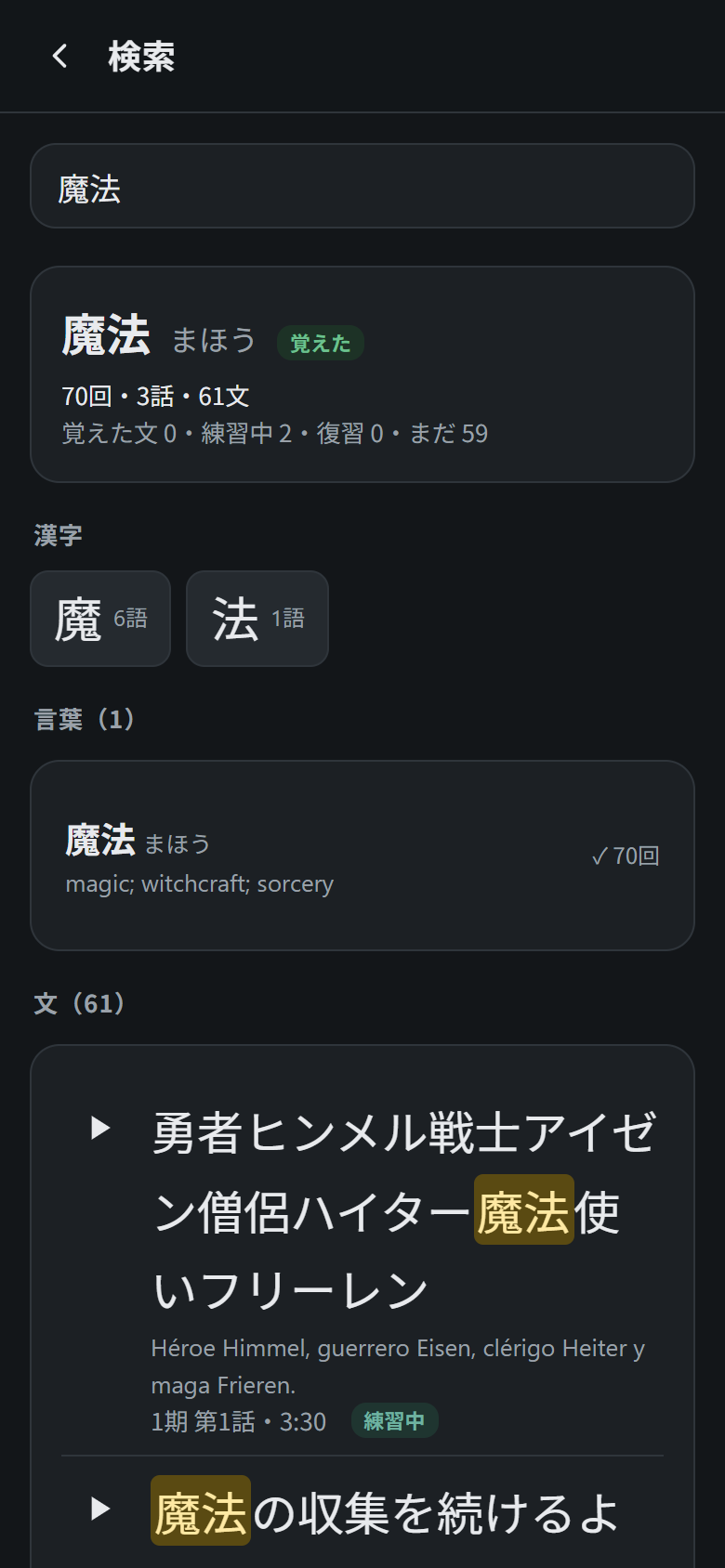
The 🔍 button on the home screen searches everything you have imported: words (by spelling, reading or meaning), lines (in Japanese, by their kana reading, or by their translation, so 「magia」 finds the lines about magic), grammar patterns and kanji. When you type a whole word you also get a summary: how many times it appears, in how many episodes, and how many of its lines you already know, are practising or have due for review. Every line can be played right there.
Kanji sheet
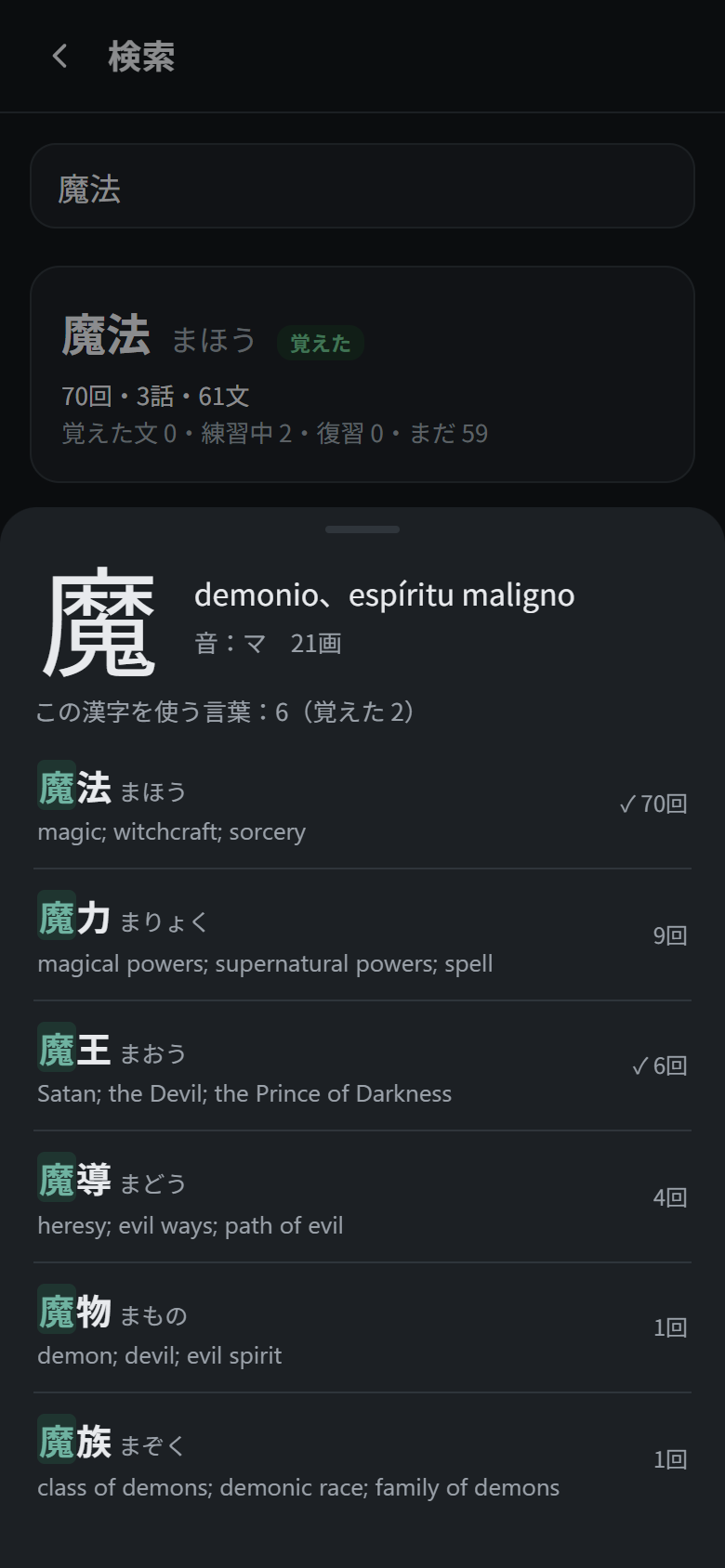
Tap a kanji under a word in word details, in search or after a kanji question. You get its readings and meaning (from KANJIDIC, if the pack has your dictionaries) and every word from your own episodes that uses it, most frequent first, with the ones you know ticked. Tap a word to open it, then one of its kanji, and so on: your vocabulary becomes a web of words linked by their kanji instead of a list.
Grammar details
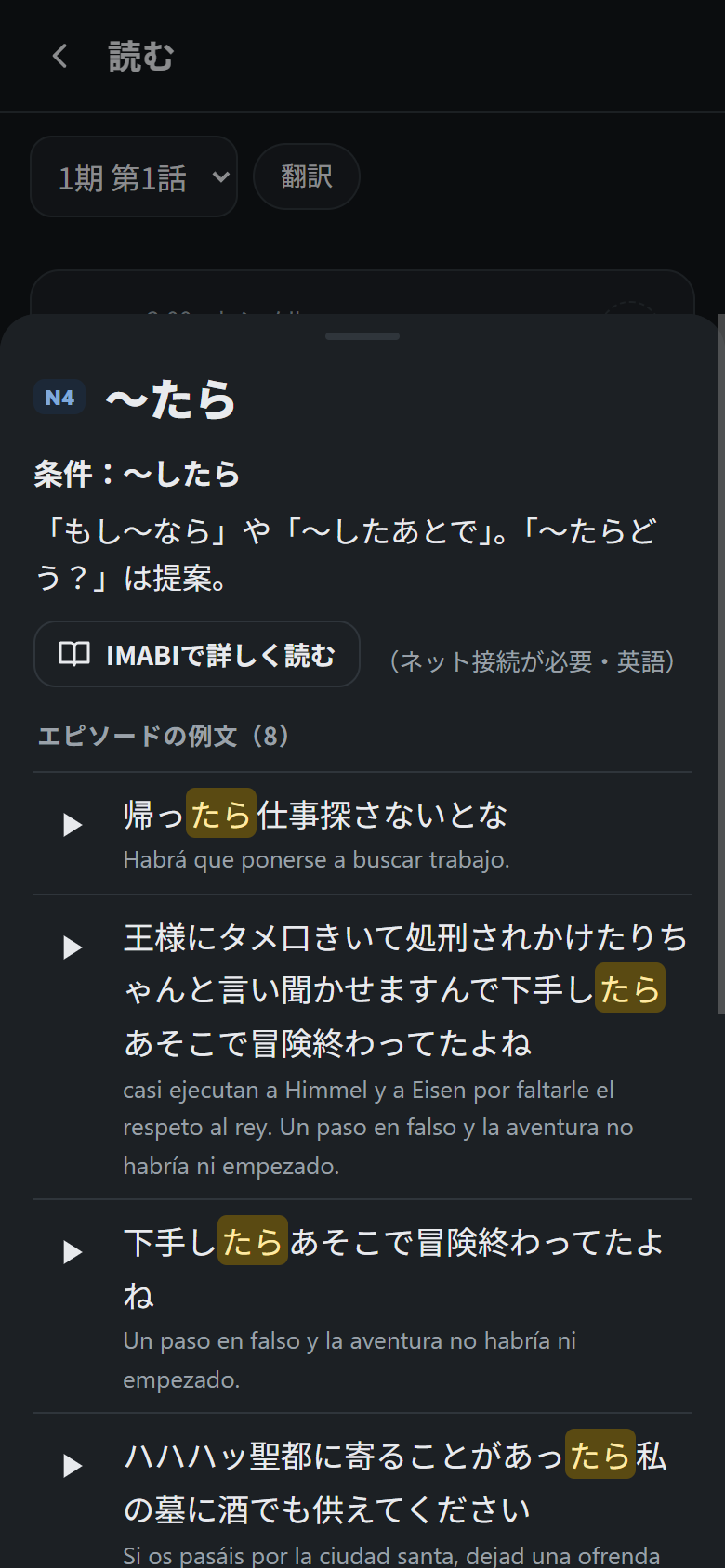
Each pattern has its JLPT level, a short explanation, a link to IMABI for a full lesson (in English) and every line in your episodes that uses it.
Vocabulary (単語帳)
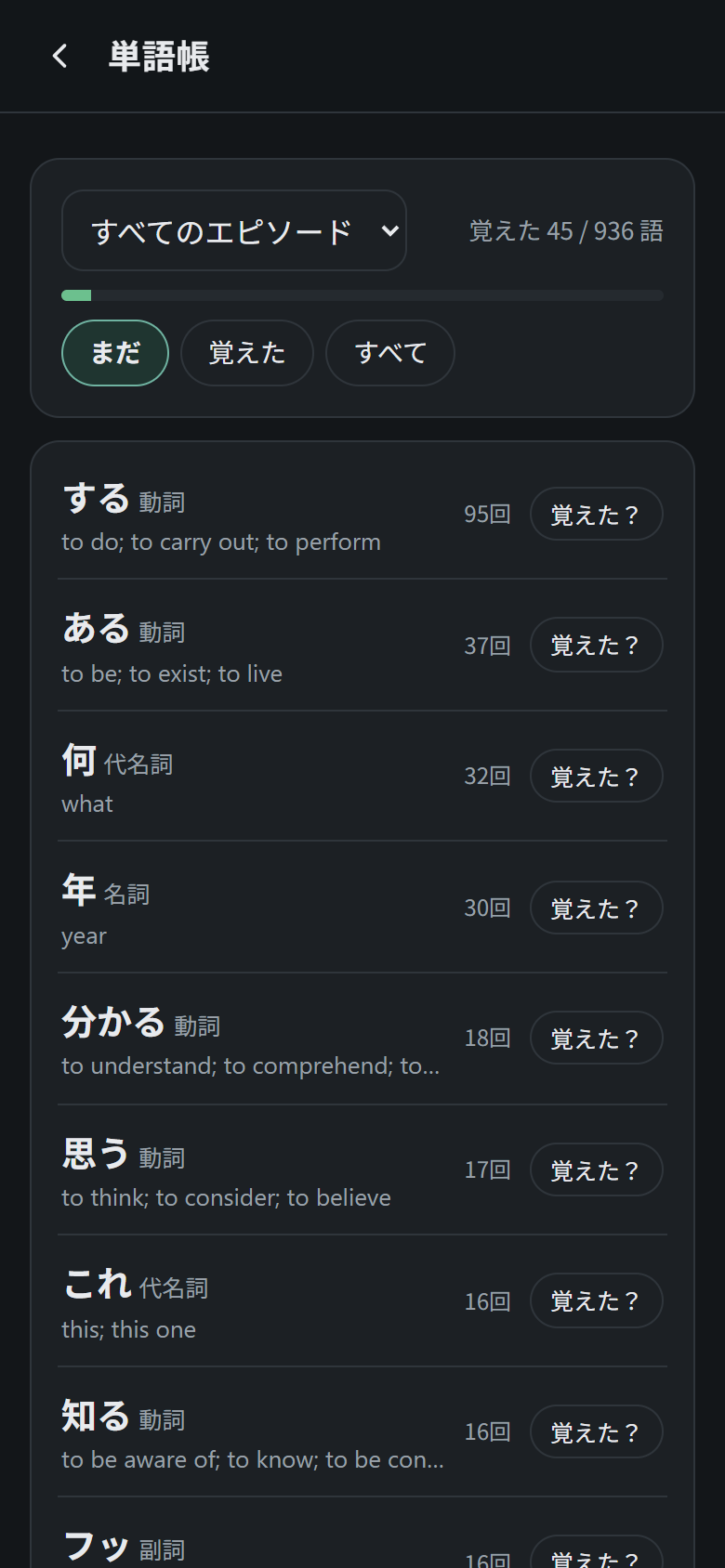
Every word from your episodes, most frequent first, filtered by episode and by not yet (まだ), known (覚えた) or all (すべて), with a progress bar of known words.
Grammar list (文法リスト)
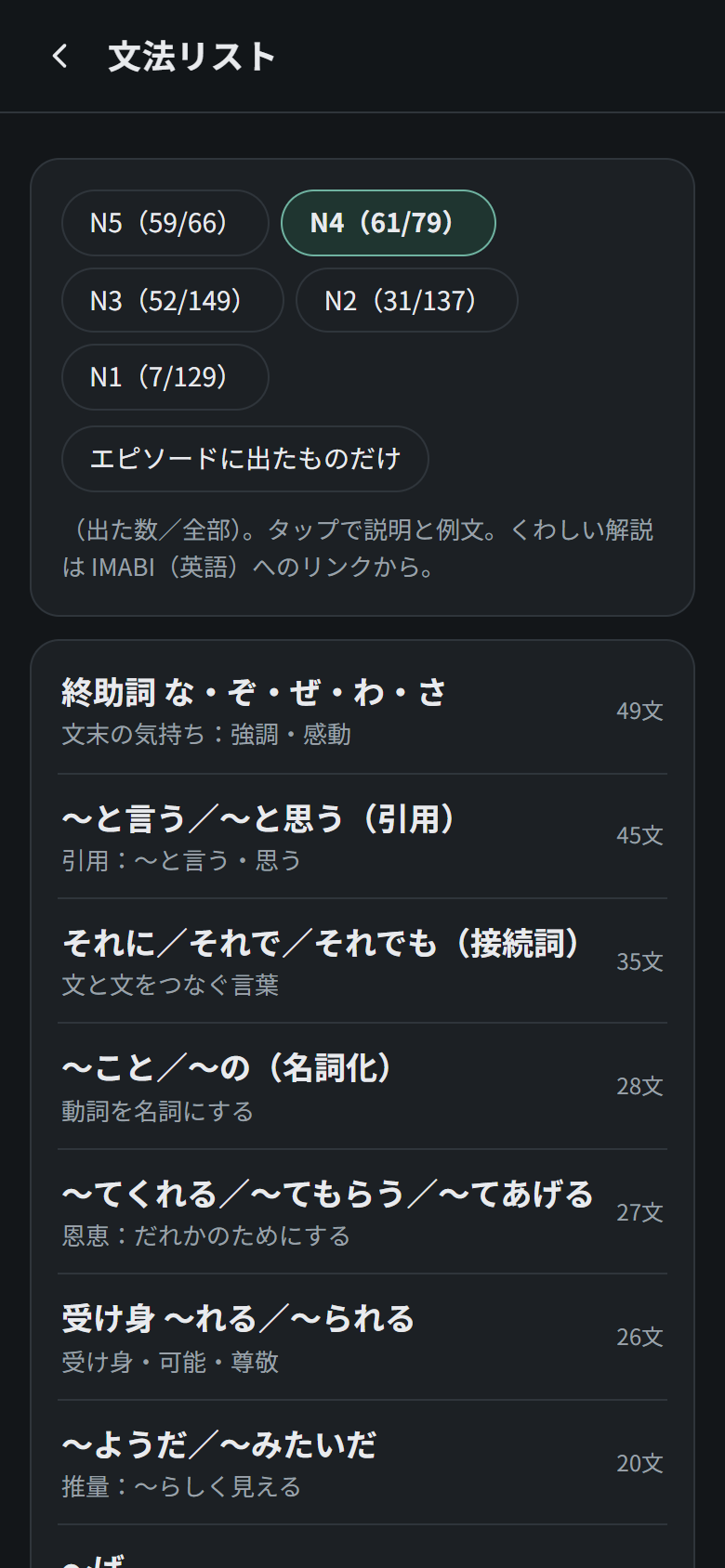
560 patterns from N5 to N1. For each level it shows how many appear in your episodes, and it can be filtered to those that appear (エピソードに出たものだけ).
Progress (記録)
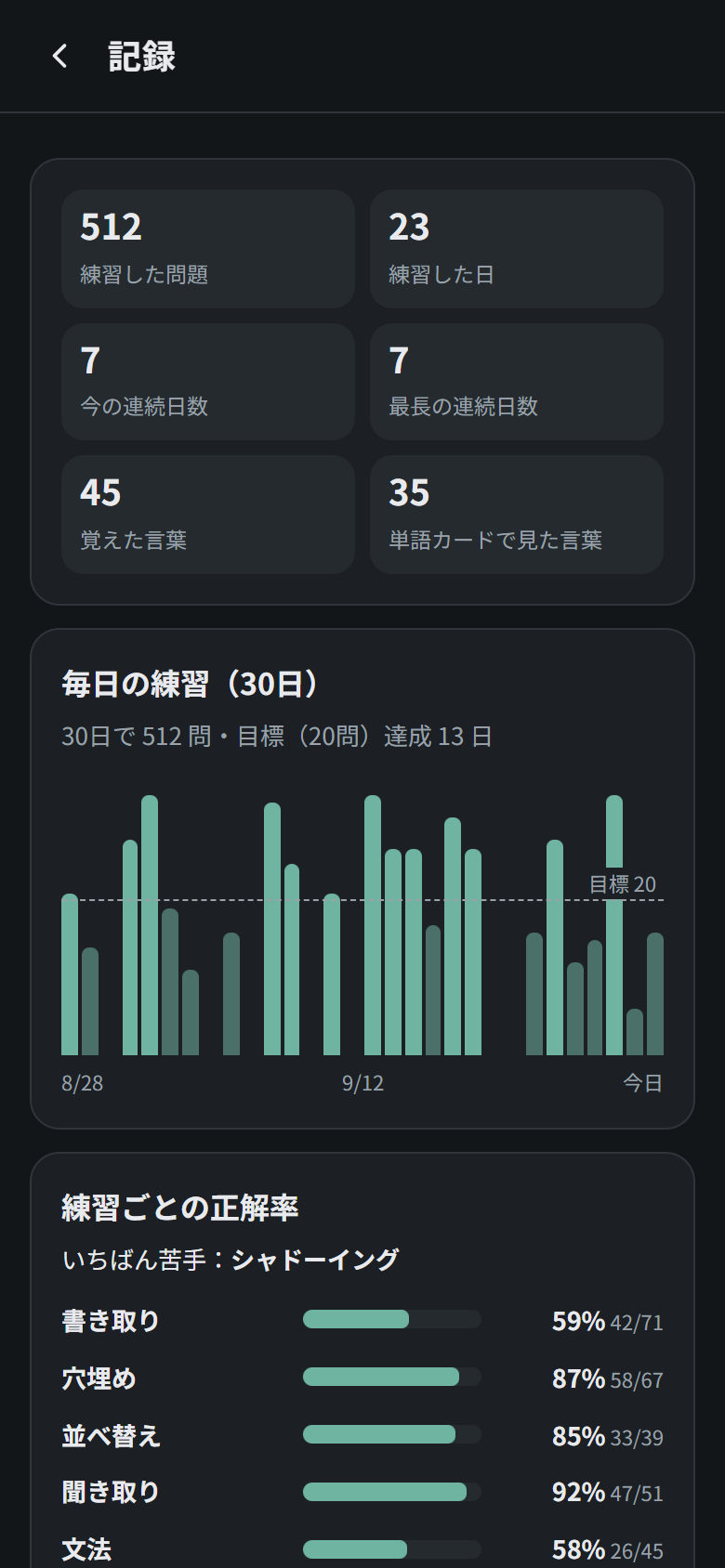
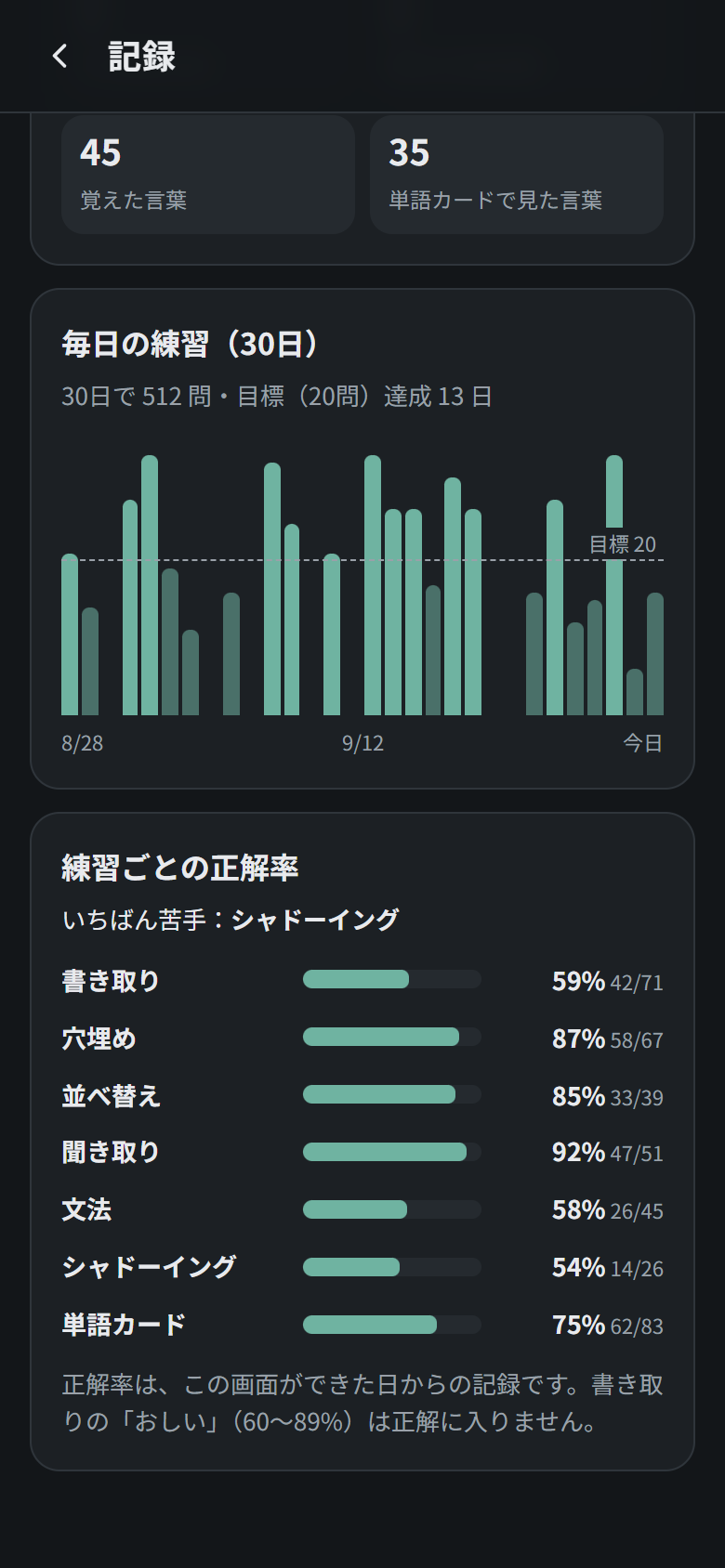
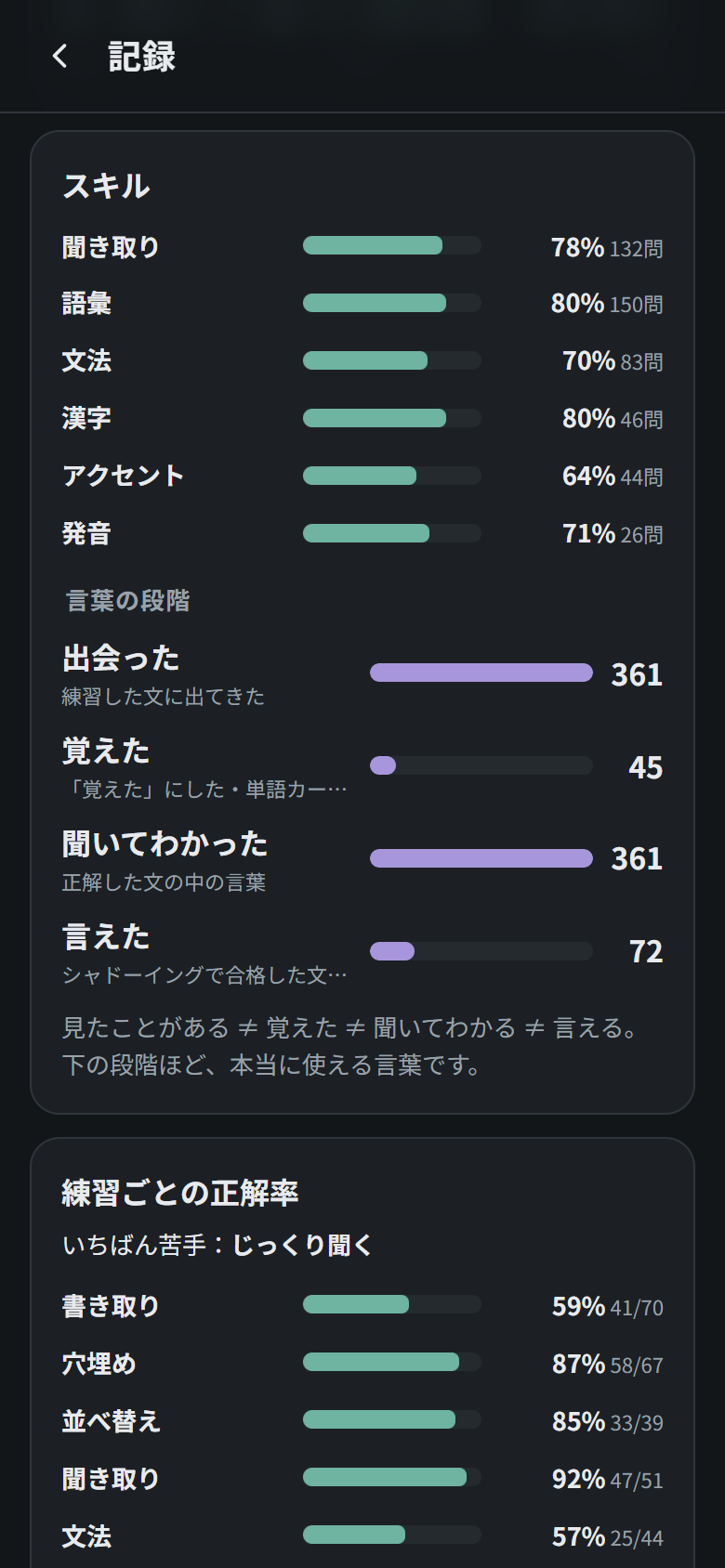
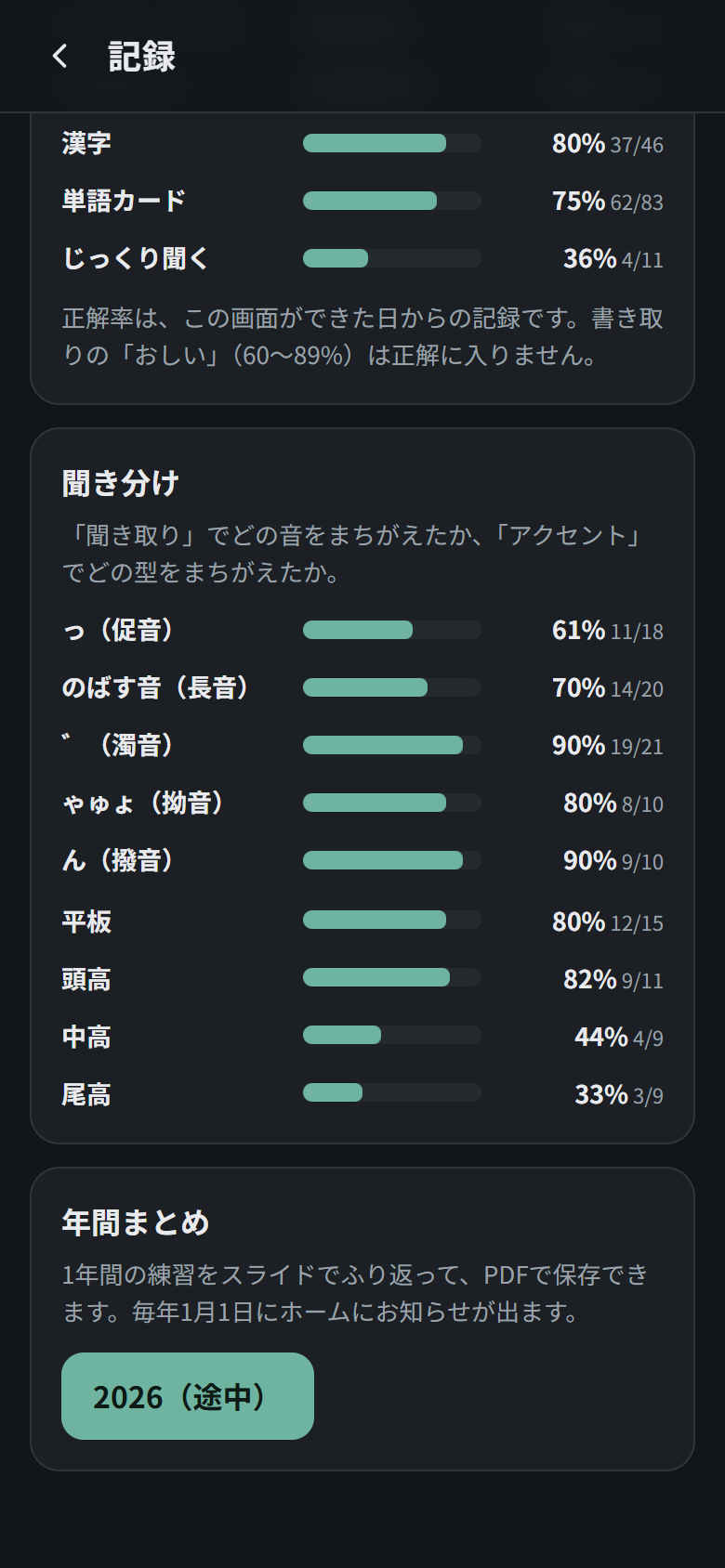
Open it by tapping the progress card on the home screen (記録を見る).
- Totals: questions answered, days practised, current streak, best streak, known words and words seen in word cards.
- Last 30 days: one bar per day with your daily goal as a dashed line. Bars that reach the goal are highlighted, and tapping a bar shows that day’s count.
- Skills (スキル): accuracy for listening, vocabulary, grammar, kanji, pitch accent and pronunciation, each made from the drills that train it.
- Word stages (言葉の段階): how many words you have met (in lines you practised), memorised (marked as known or long-term in word cards), understood by ear (in lines you answered correctly) and said (in lines you passed in shadowing). Seeing a word is not the same as catching it by ear or being able to say it, and this shows the difference.
- Accuracy by drill, with your weakest drill called out.
- Hearing the difference (聞き分け): your accuracy for each kind of sound in the listening drill (っ, long vowels, ゛, ゃゅょ, ん) and for each pattern in the pitch accent drill (平板, 頭高, 中高, 尾高). When you pick a wrong option, the listening drill also tells you which kind of sound it was.
Yearly wrap-up (年間まとめ)
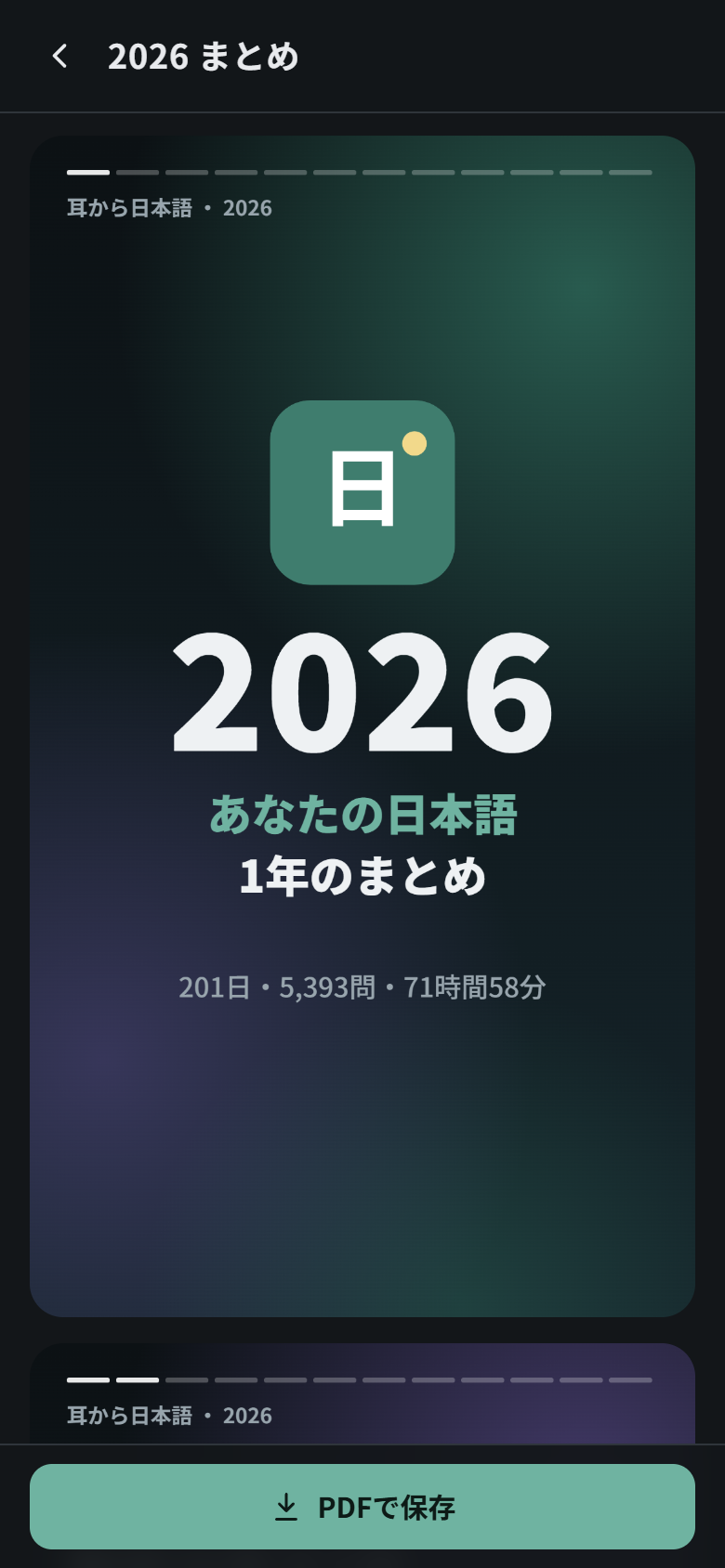
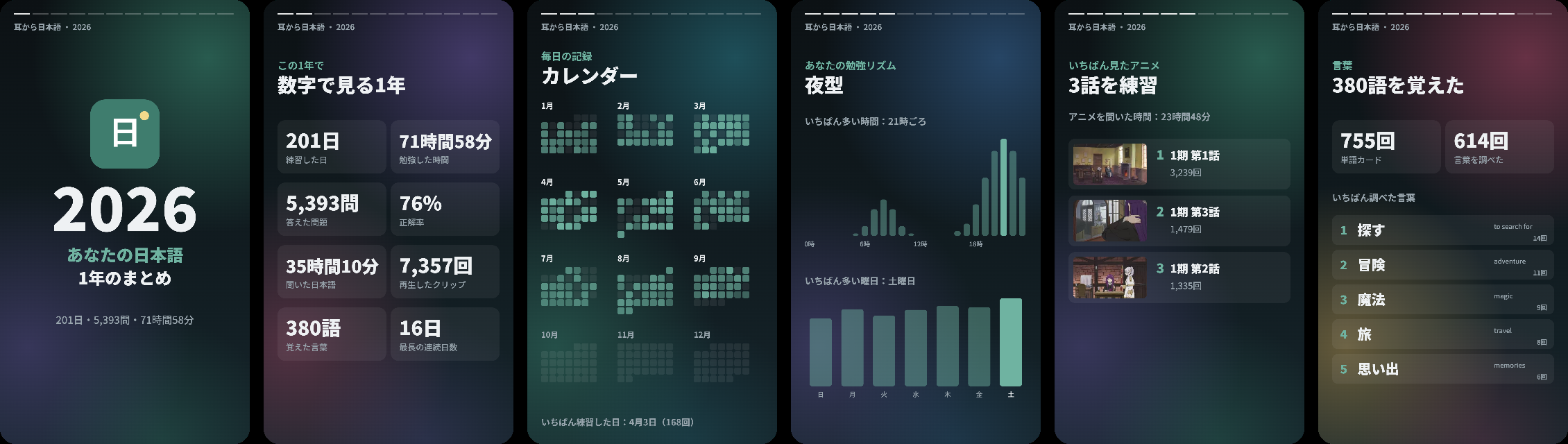
Like a “Wrapped” for your Japanese. Every 1 January a card appears on the home screen (for the whole month, and you can dismiss it) with a summary of the year that just ended. It is also always available from 記録 → 年間まとめ, including the current year so far.
The summary is a set of story-style slides, and PDFで保存 saves them as a PDF (one slide per page) to keep or share. It includes:
- The year in numbers: days practised, study time, questions answered, accuracy, minutes of Japanese listened to, clips played, words learned and longest streak.
- A calendar of every day, month by month, coloured by how much you practised, plus your busiest day.
- Your best month, and your study rhythm: the hours of the day and days of the week you practise most (morning person or night owl?).
- Anime: the episodes you practised most, with their thumbnails, and how long you listened.
- Audiobooks: the books and chapters you listened to, and the chapters you finished.
- Drills: your favourite drill and your accuracy in each one.
- Words: words learned, word-card reviews and the words and grammar you looked up most.
- Shadowing and Anki: your best shadowing score, how many times you shadowed and how many cards you sent to Anki.
Slides with no data are skipped. The daily record behind it is stored on the phone and included in the backup; the app started keeping the detailed record (drills, episodes, listening time…) with this feature, so earlier days only count days and answers.
Anki
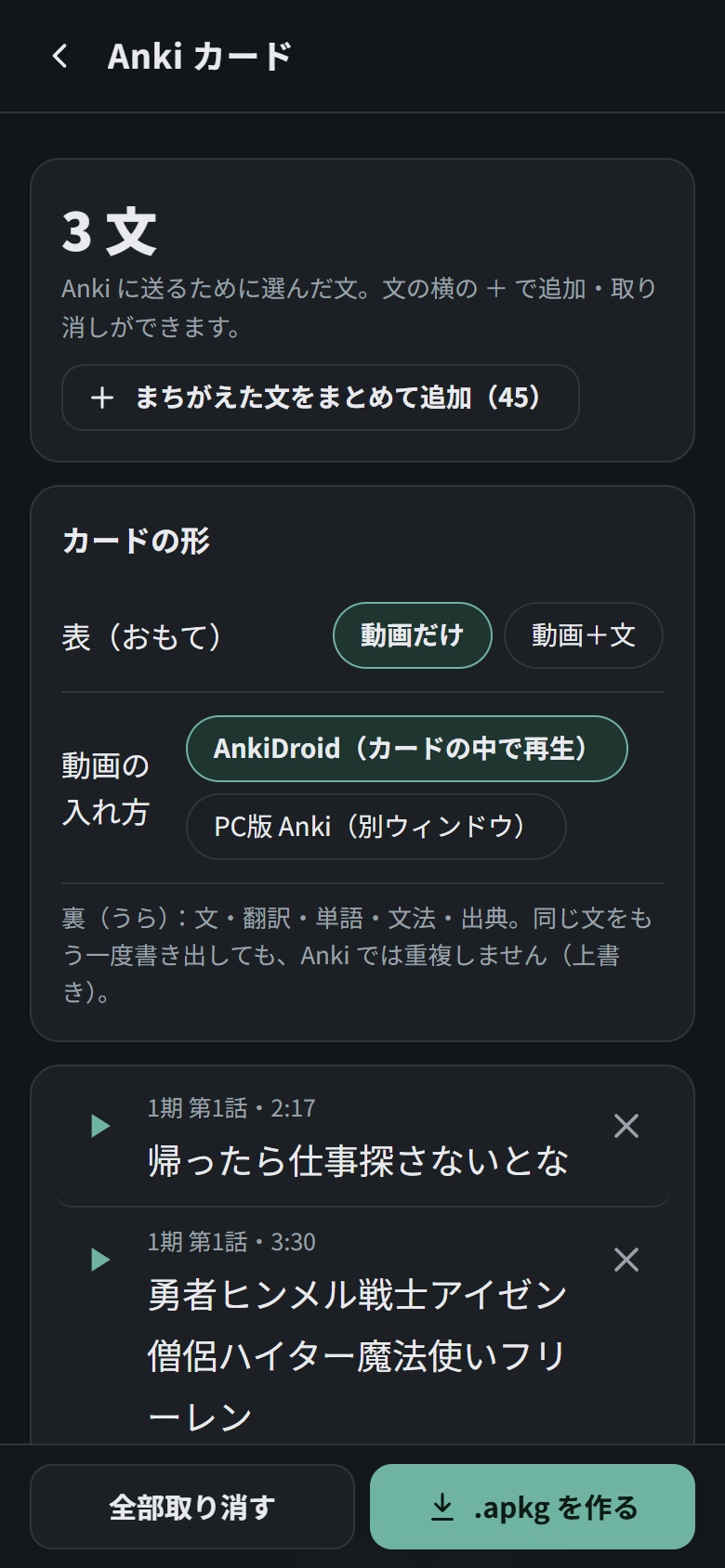
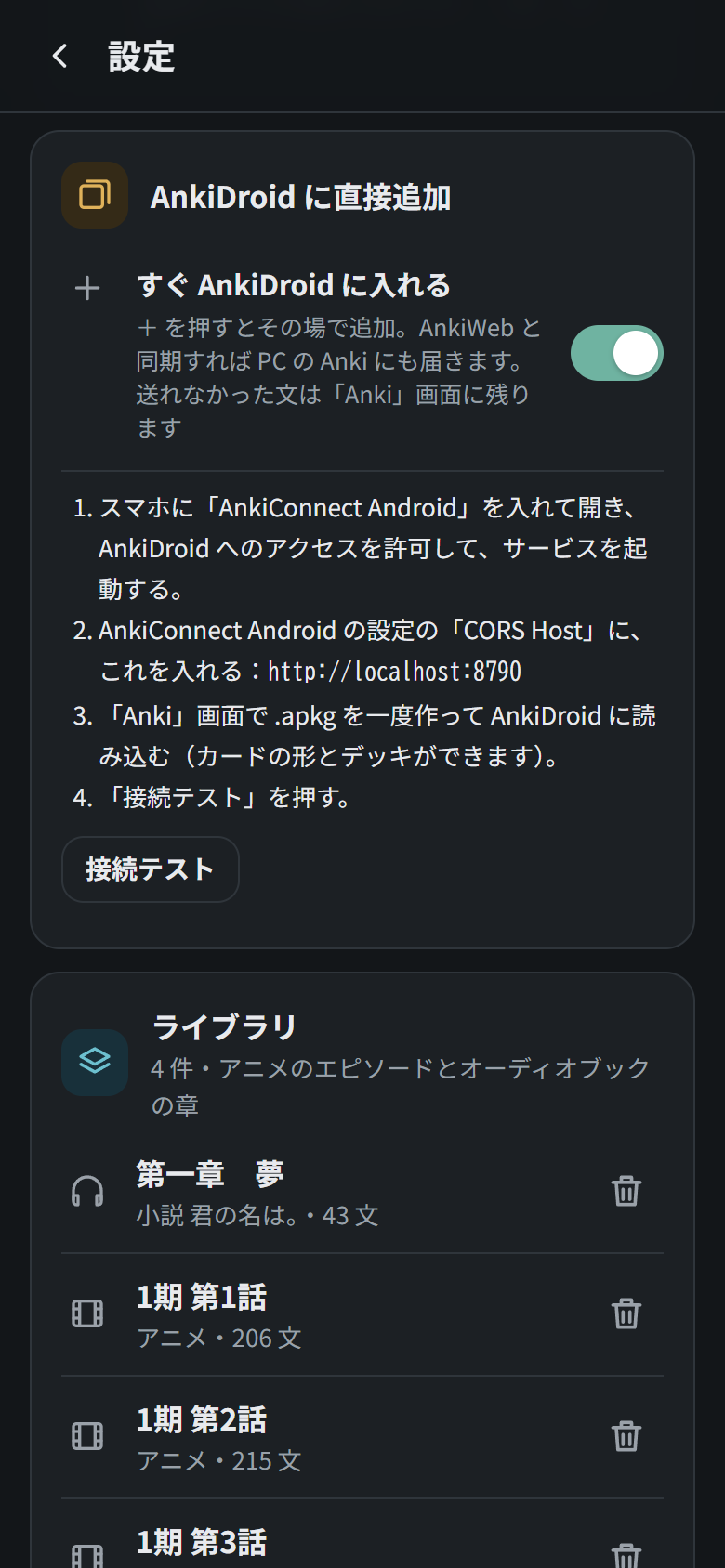
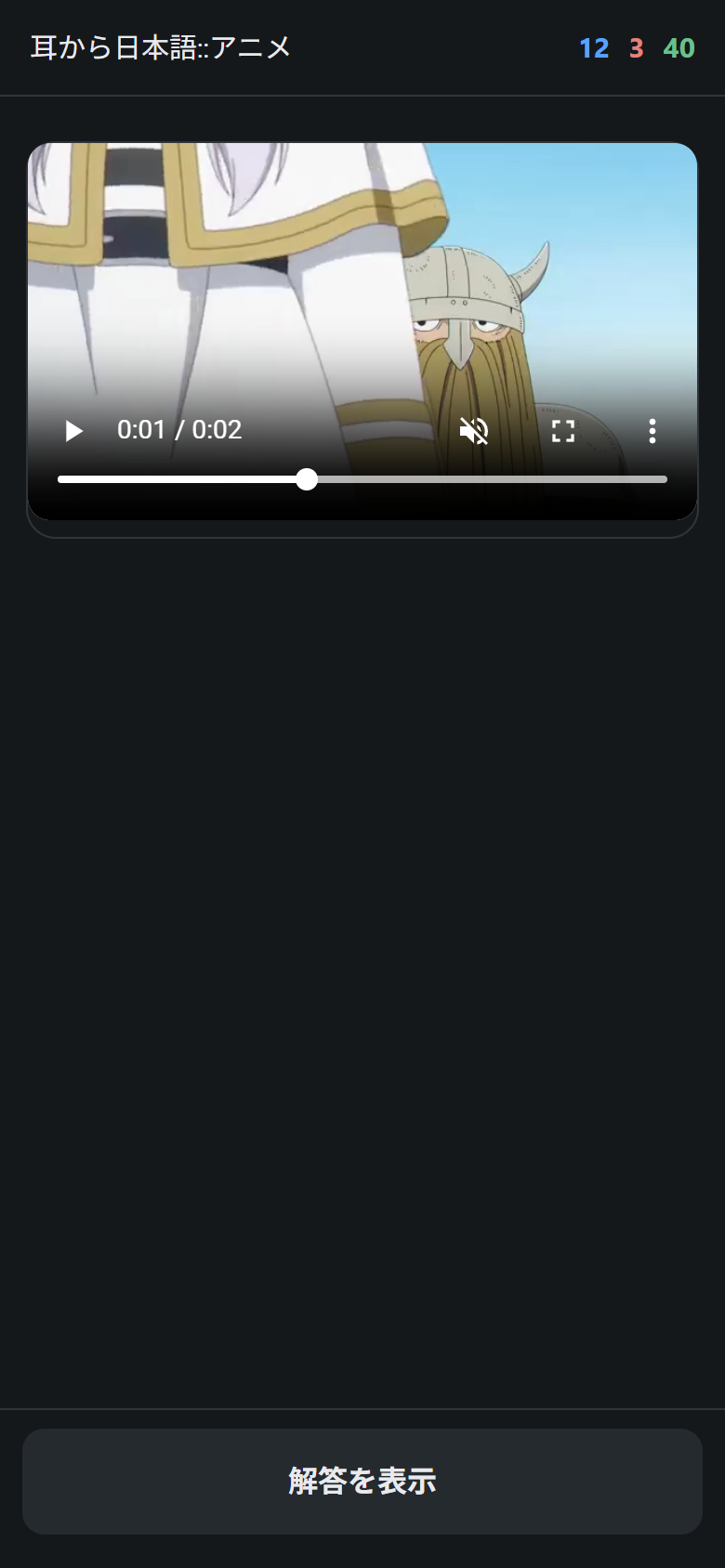
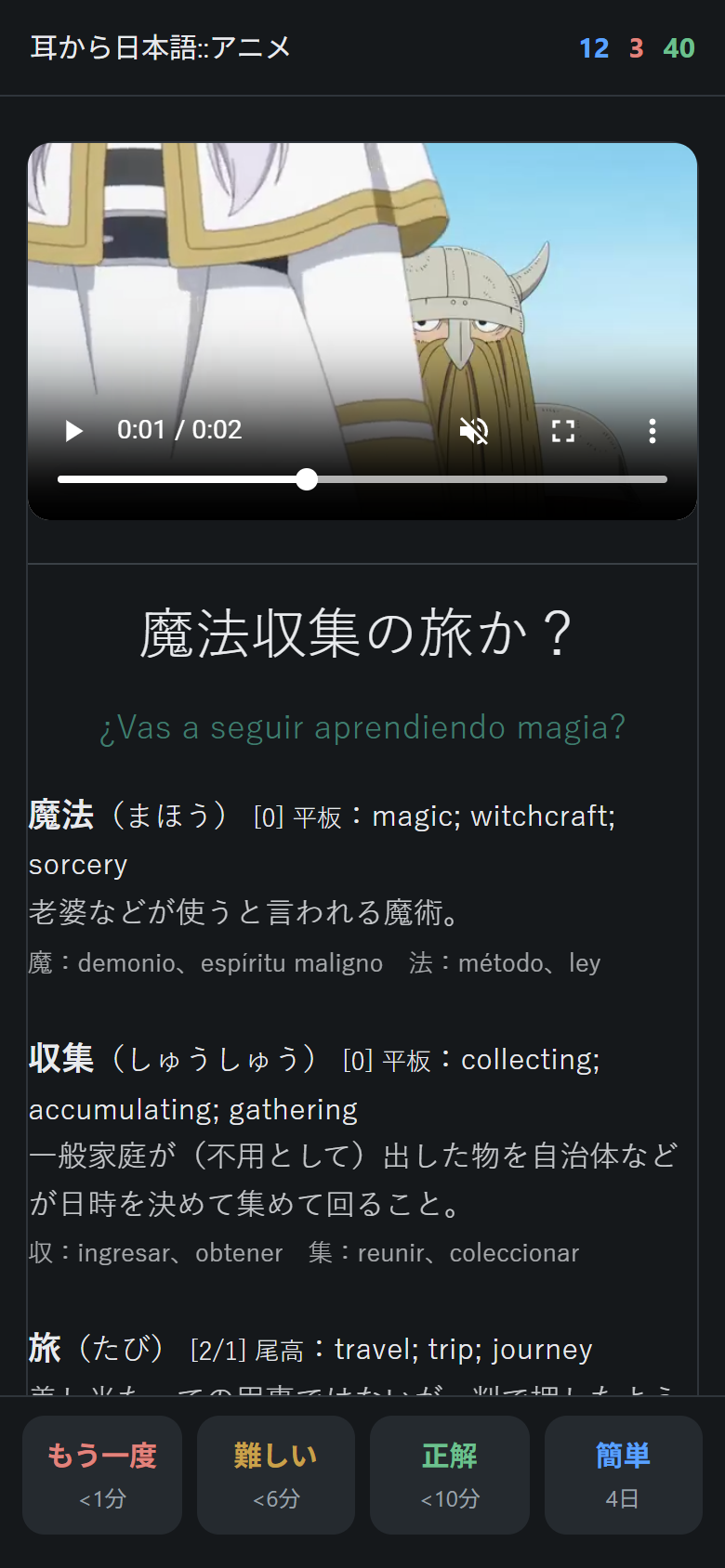
Any line can become an Anki card. The front is the clip (optionally with the sentence), so you review by ear. The back has the sentence, the translation and, for every word, its reading, pitch accent, English meaning, a one-line Japanese definition and the meaning of each kanji (the last three when the pack has your dictionaries), followed by the grammar patterns and where the line comes from. The pictures above show a card in night mode, drawn with the card’s own template and style. There are two ways to get cards into Anki:
- Export an
.apkgfrom the Anki screen (Anki カード). Choose whether the front shows the video alone or the video plus the sentence, and whether the video plays inside the card (AnkiDroid) or in a separate window (desktop Anki). + まちがえた文をまとめて追加 adds every line you have got wrong in one go. - Send cards directly to AnkiDroid when you tap +, with no files involved. AnkiDroid then syncs them to AnkiWeb and desktop Anki.
Step-by-step instructions for both are in Set up Anki.
Settings (設定)
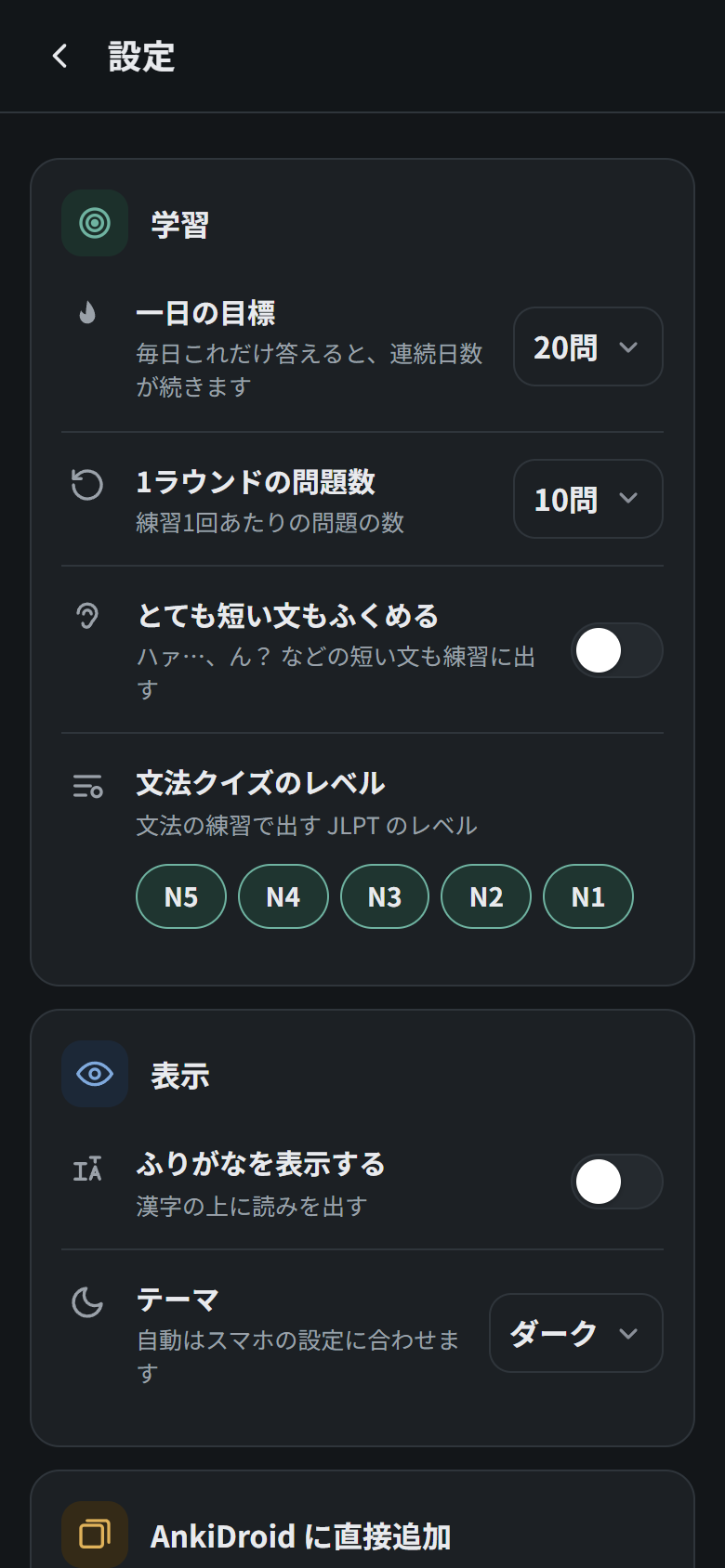
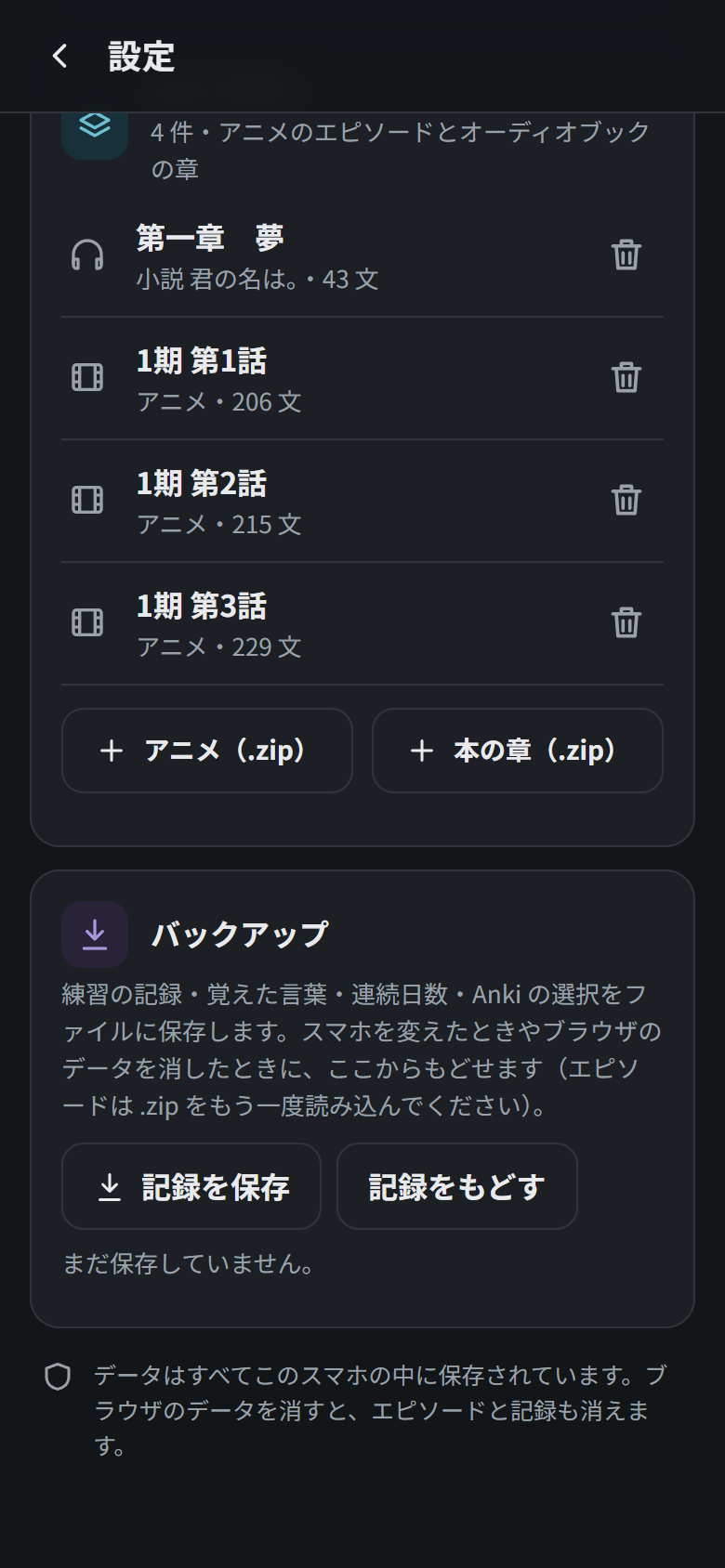
Open it with the ⚙ button on the home screen. Settings are grouped into cards, and every setting has a one-line explanation under it.
| Card | Setting | Meaning |
|---|---|---|
| 学習 (study) | 一日の目標 | Daily goal: type any number of questions from 1 to 9999. |
| 1ラウンドの問題数 | Questions per round: any number from 1 to 9999. | |
| とても短い文もふくめる | Include very short lines such as ハァ… or ん?. | |
| 文法クイズのレベル | JLPT levels used in the grammar drill. | |
| 表示 (display) | ふりがなを表示する | Show furigana. |
| 全画面の字幕の大きさ | Size of the Japanese subtitles when watching an episode full screen: 小 (small), 中 (medium, the default) or 大 (large). | |
| テーマ | Theme: auto (follows the phone), light or dark. | |
| AnkiDroid に直接追加 | すぐ AnkiDroid に入れる | Send cards straight to AnkiDroid when you tap +. See Set up Anki. |
| ライブラリ (library) | Your imported episodes and chapters, and how much storage the app is using. The 🗑 button deletes one; + アニメ(.zip) and + 本の章(.zip) import more. | |
| バックアップ (backup) | 記録を保存 / 記録をもどす | Save or restore your progress. See Back up your progress. |
Light and dark themes
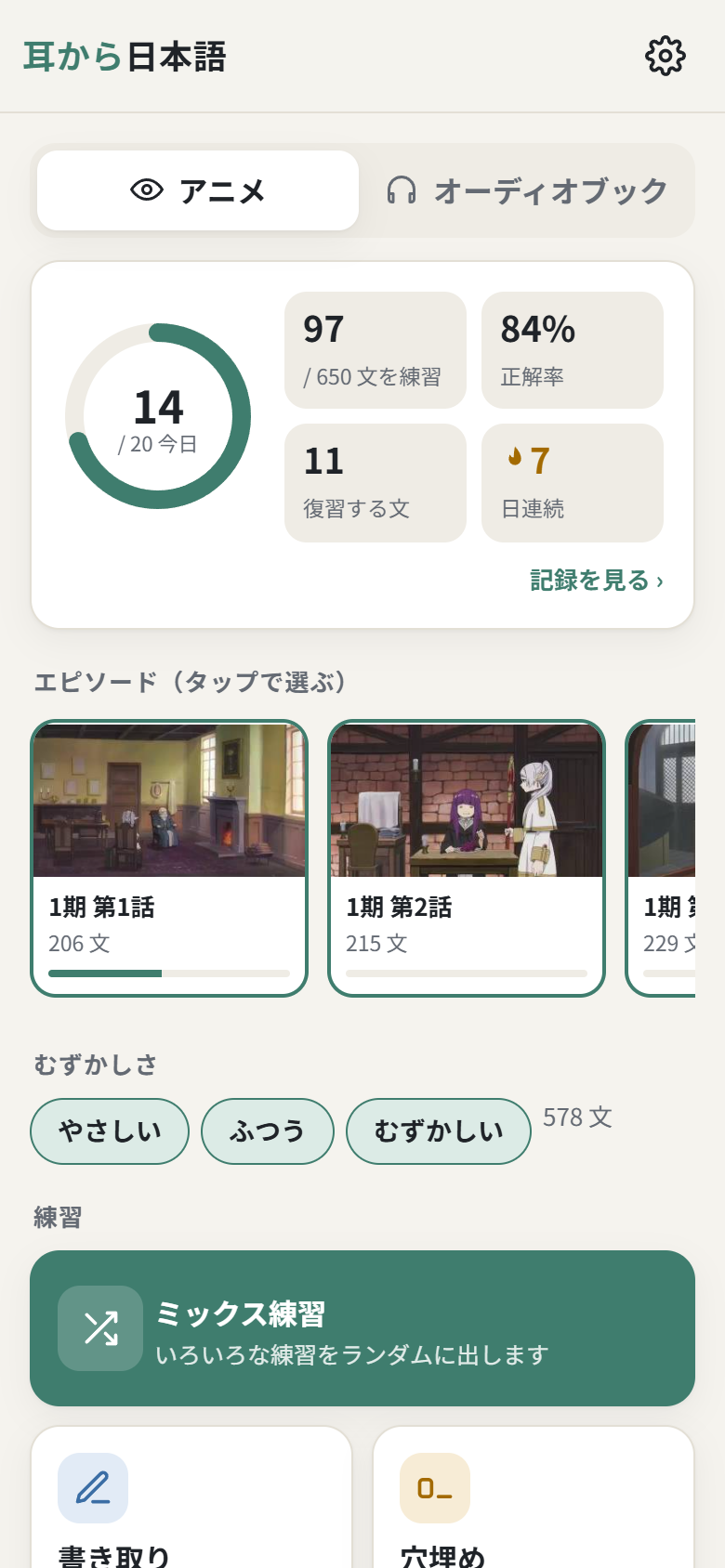
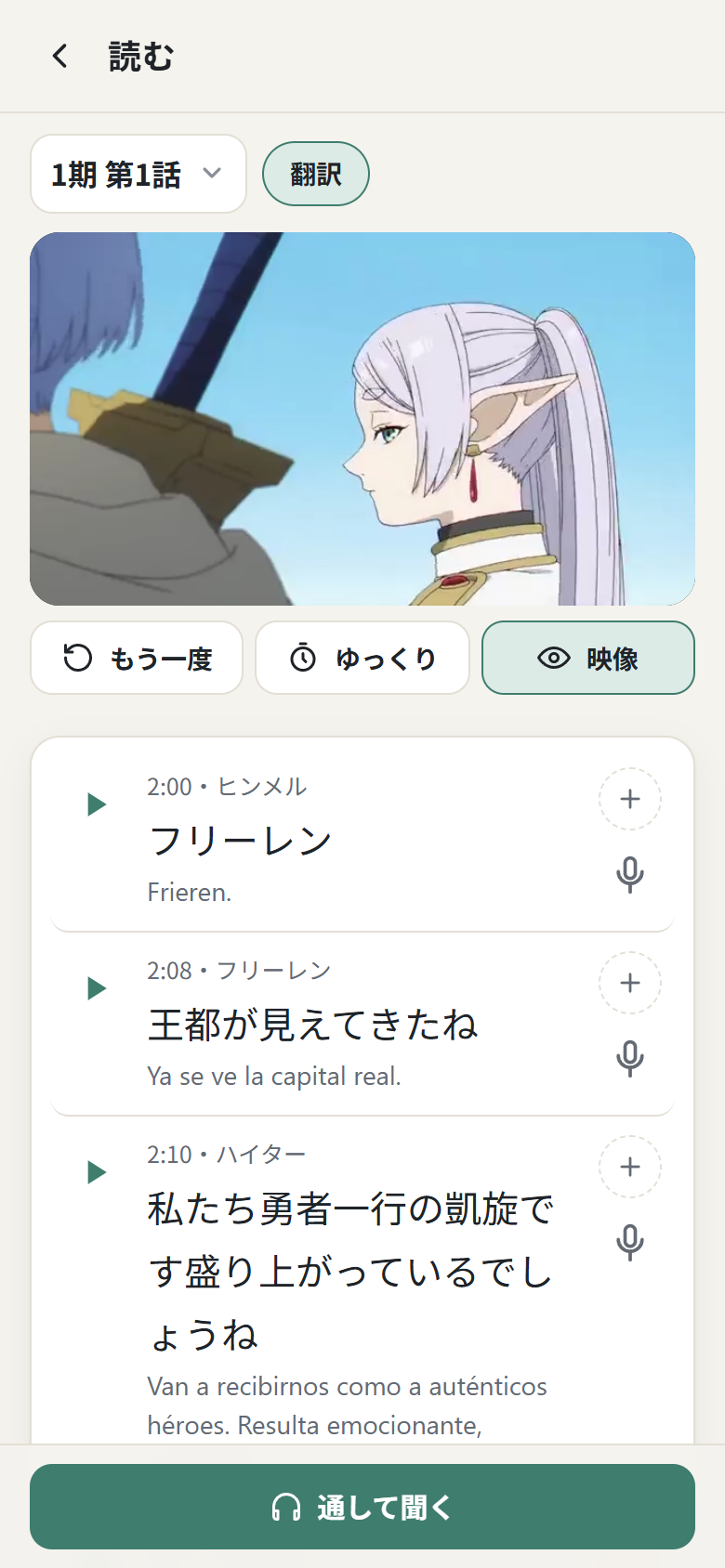
The app has a light and a dark theme. By default it follows your phone’s setting; you can also choose one in ⚙ 設定 → 表示 → テーマ. The other screenshots in this README use the dark theme.
Audiobooks (オーディオブック)
Audiobook tab
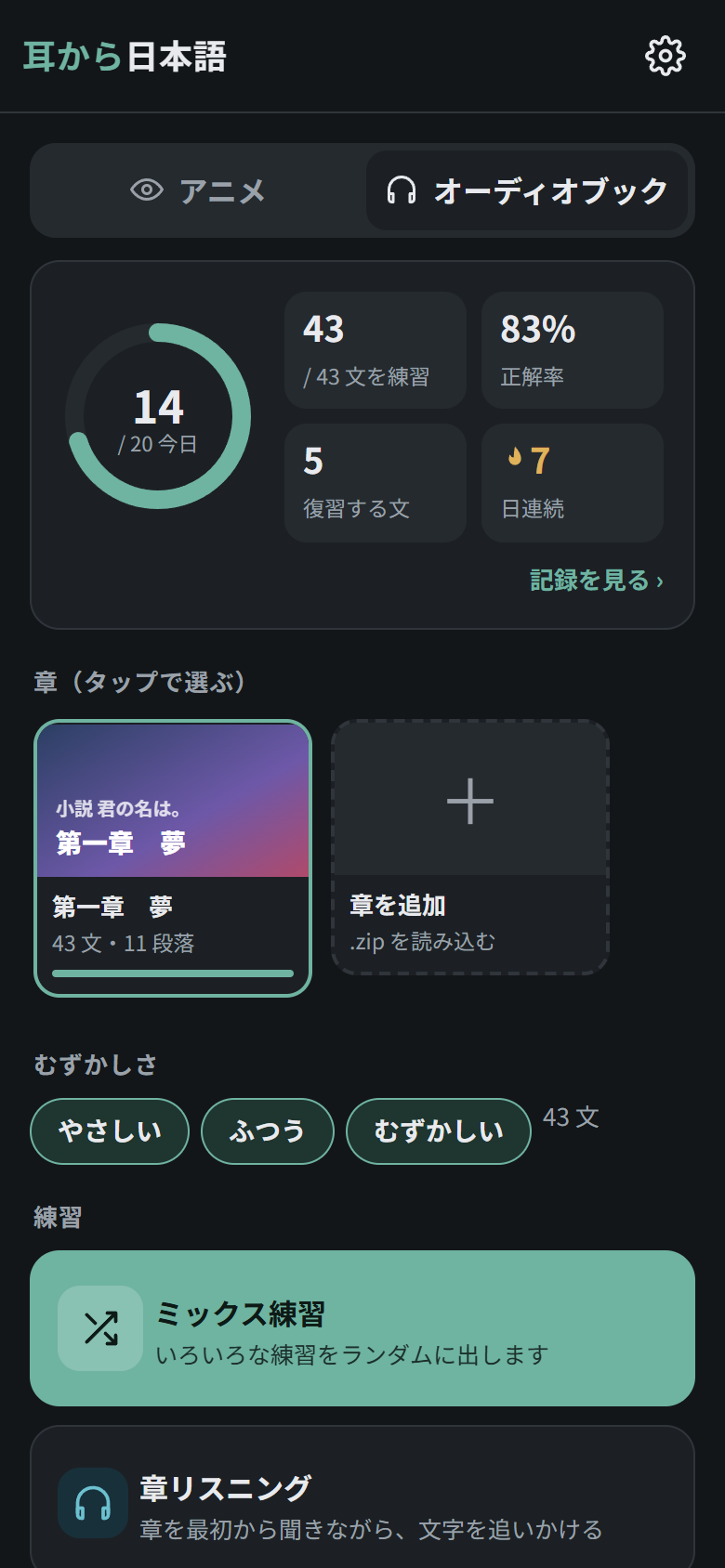
The オーディオブック tab works like the anime one, but with audio clips cut from a narrated book. Each chapter (章) has its own card with the book title, and the script also splits every chapter into paragraphs (段落) using the narrator’s pauses. All the drills work here too; the wide button under them, 章リスニング, plays the whole chapter with a live transcript. How to create the packs is explained in Create audiobook packs.
Chapter listening (章リスニング)
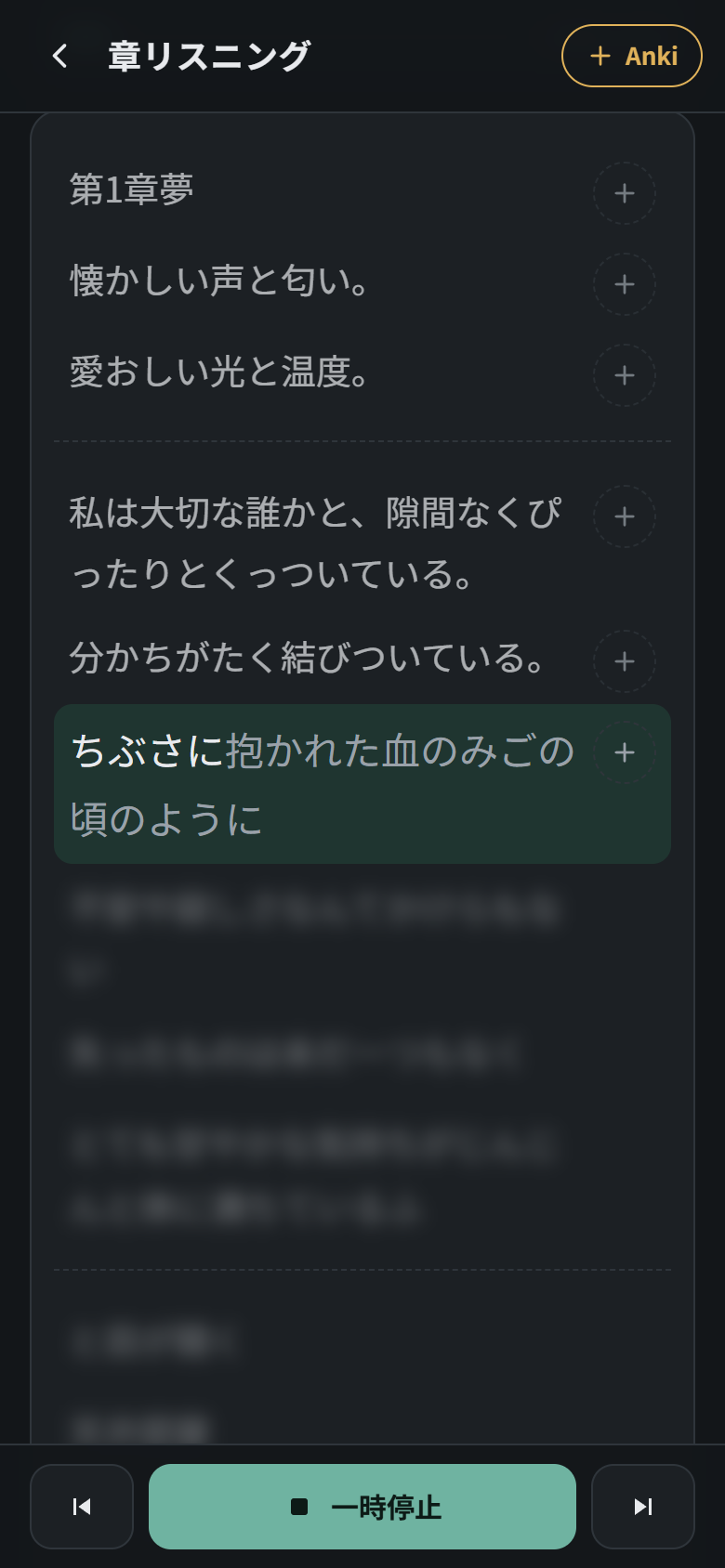
Listen to the whole chapter while the transcript follows along, like live subtitles. The sentence being read is highlighted and fills in word by word as the narrator speaks; sentences already heard stay readable, and the ones still to come are blurred so you listen before you read (先の文も表示 shows them). The page scrolls along on its own, pausing for a few seconds if you scroll yourself.
- ⏮ ⏯ ⏭ go to the previous sentence, pause or resume, and go to the next sentence. Tap any sentence to jump to it, or the time bar to jump to that point of the chapter.
- + Anki in the top-right corner always adds the sentence being read; the small + next to each sentence adds that one.
- Tap any word for its meaning. The speed button slows the audio down or speeds it up.
- It remembers where you stopped in each chapter, and at the end of a chapter it moves on to the next one if you have imported it.
Paragraph listening (段落リスニング)
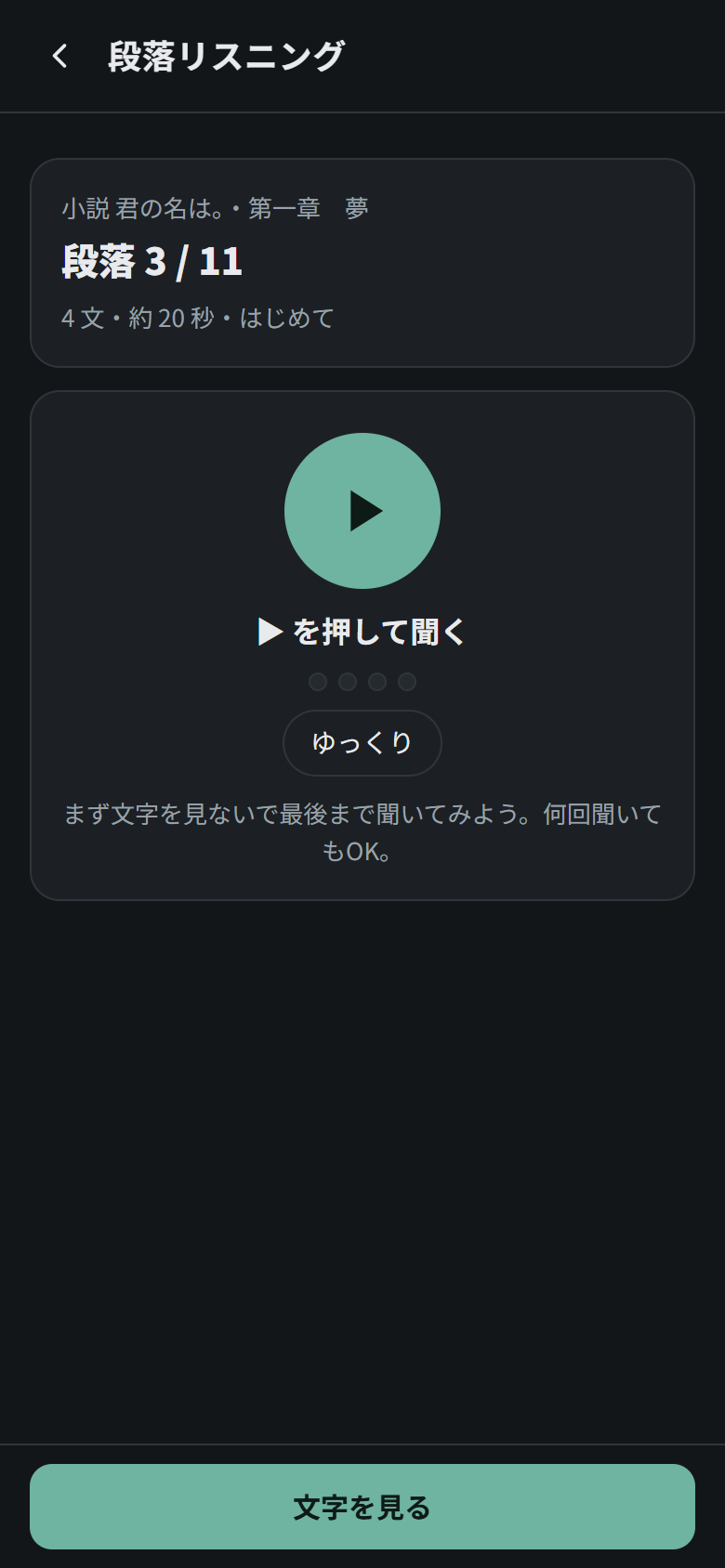
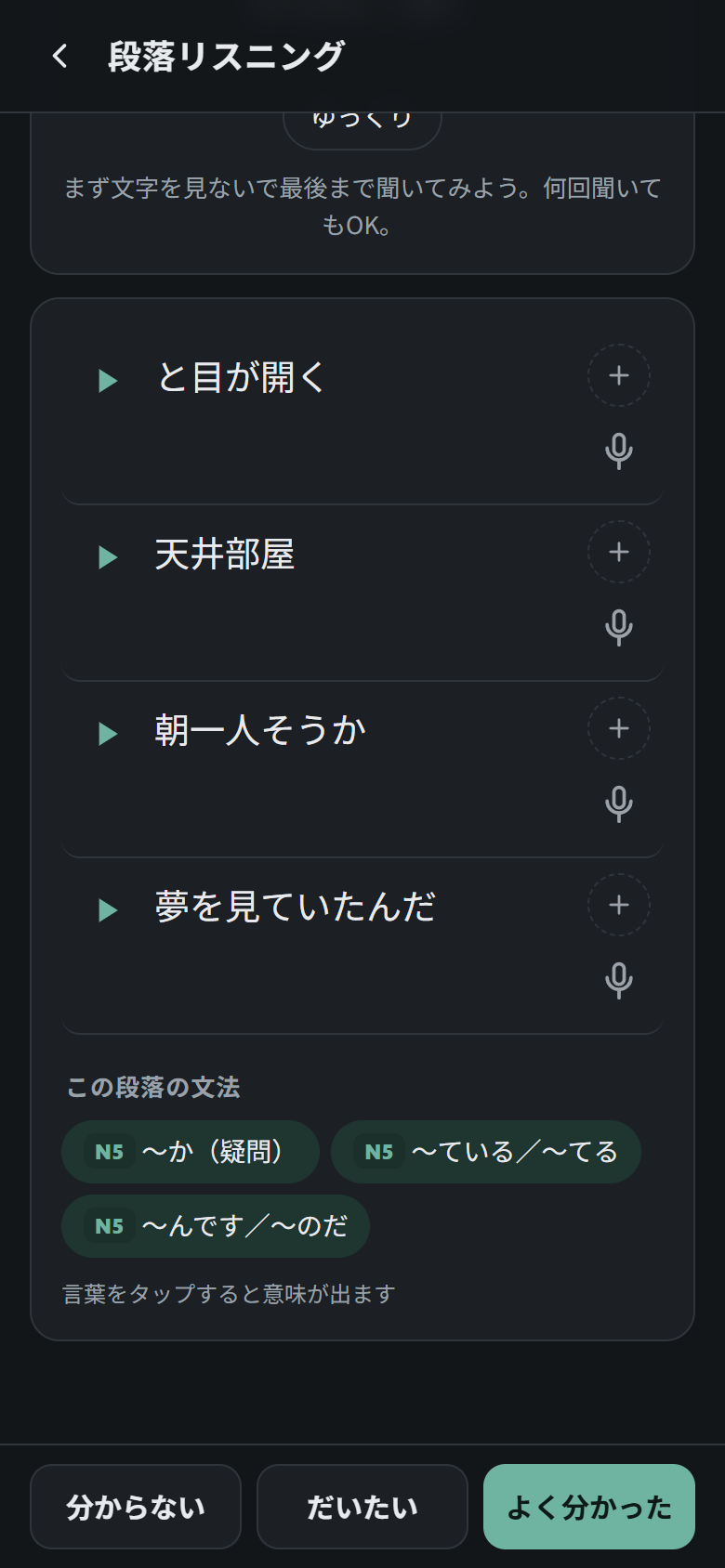
Open it with 練習 next to any paragraph in the chapter reader. Listen to that paragraph without seeing the text, as many times as you like; the dots show which sentence is playing. Then tap 文字を見る to reveal it: every sentence can be replayed, sent to Anki or shadowed, and the paragraph’s grammar patterns are listed underneath. Finally rate how much you understood (分からない / だいたい / よく分かった), which feeds the spaced repetition.
Chapter reader (読む)
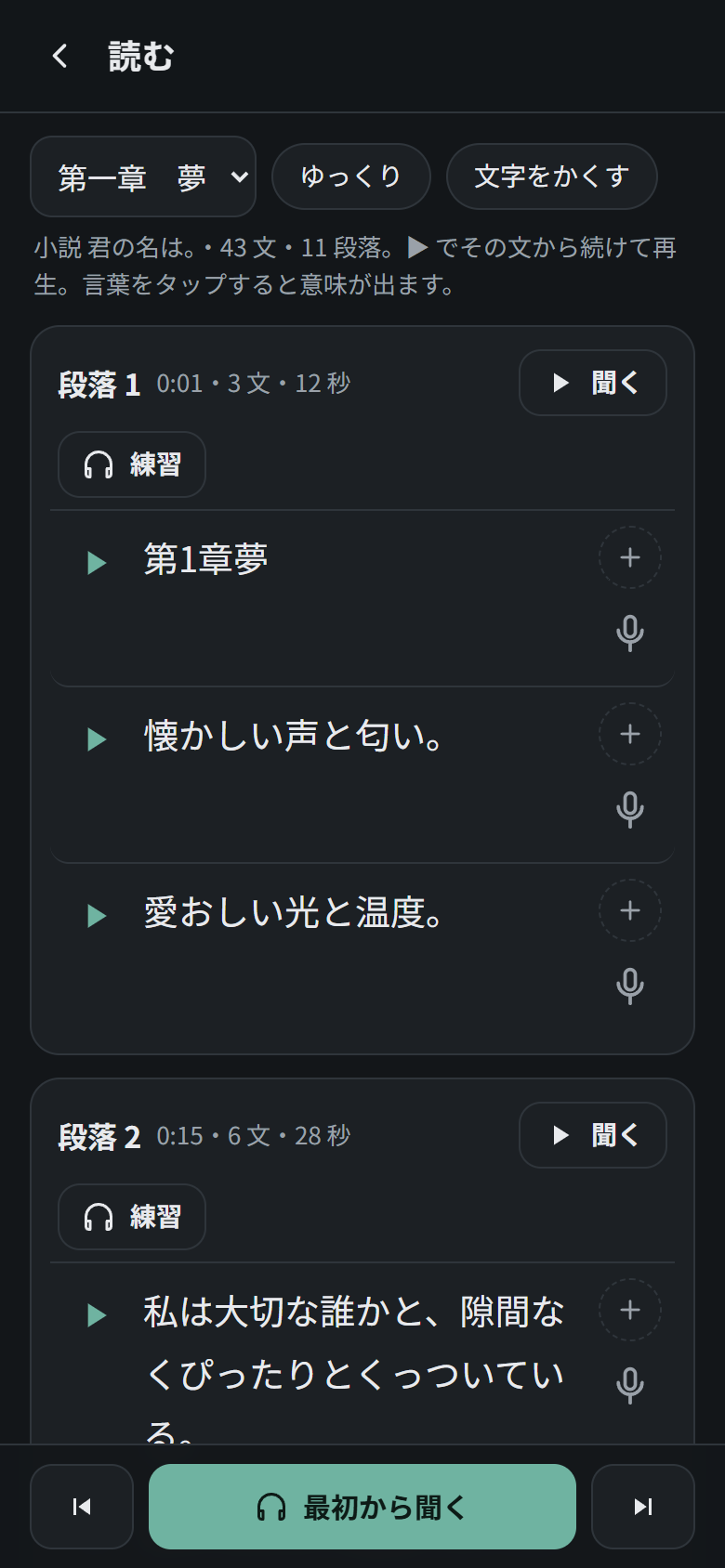
The whole chapter, grouped by paragraph. 最初から聞く plays the chapter from start to finish, sentence by sentence: the current sentence is highlighted and the page scrolls along with it. Tap any sentence to continue from there, step back or forward one sentence with ⏮ ⏭, listen to a single paragraph (聞く) or practise it (練習). 文字をかくす hides the text so you can listen first, and The speed button slows the audio down or speeds it up.
📱 Install the app on your phone
The app is live at wortaxx.github.io/mimikara-nihongo/app/. It installs like a normal app: its own icon, full screen and no browser bar, and it works offline.
Scan with your phone's camera to open the app
Android (Chrome)
- Open wortaxx.github.io/mimikara-nihongo/app/ in Chrome.
- Tap インストール on the アプリとしてインストール card on the home screen. Chrome only shows the card after you have tapped around for a few seconds.
- If the card does not appear, open Chrome’s menu ⋮ → Install app (or Add to Home screen, called ホーム画面に追加 in Japanese Chrome) and choose Install, not “Create shortcut”. A shortcut just opens the browser.
- The 日 icon appears on your home screen and in the app drawer.
iPhone / iPad (Safari)
- Open the address in Safari.
- Tap Share (the square with an arrow) → Add to Home Screen → Add.
The app works on iOS, with a few limits: sending cards straight to AnkiDroid is Android-only (use .apkg export instead), and the pronunciation score in shadowing depends on Safari’s speech recognition.
After installing
- Import your episodes: copy the
.zippacks to the phone and tap + エピソードを追加. See Import the packs. - Bring your progress from another device: ⚙ 設定 → バックアップ → 記録を保存 there, then 記録をもどす on the phone. See Back up your progress.
- Updates: they arrive automatically and are applied the next time you open the app. To get one right away, go to ⚙ 設定 → アプリ → 最新版に更新. Your episodes and progress are kept.
[!WARNING] Don’t uninstall the app to update it: Android may delete its data together with it. Make a backup first if you ever need to.
🚀 Quick start
- Install Python 3.10+ and run
pip install -r script/requirements.txt. - Create packs from a folder with your episodes and Japanese subtitles:
python script/run_all.py "E:\Anime\MySeries". - Install the app on your phone from wortaxx.github.io/mimikara-nihongo/app/ (see Install the app on your phone), or host your own copy (step 4).
- Import the
.zipfiles with + エピソードを追加. - Practise. Optionally, connect AnkiDroid and back up your progress from time to time.
🔧 Setup guide
The steps below follow the flow shown in How it works: create the packs on your PC, open the app on your phone and import them.
1. Install the PC tools
You need Python 3.10 or newer. Anaconda or the regular python.org installer both work. Open a terminal (on Windows, Anaconda Prompt or Command Prompt) and run:
cd "C:\path\to\mimikara-nihongo\script"
pip install -r requirements.txt
What gets installed
| Package | Used for | |---|---| | `fugashi` + `unidic-lite` | Splitting Japanese into words, with readings | | `pysubs2` | Reading `.srt` / `.ass` subtitles | | `numpy` | Aligning the subtitles with the audio | | `imageio-ffmpeg` | A bundled `ffmpeg` for cutting clips. If `ffmpeg` is already on your PATH, that one is used instead. | | `faster-whisper` | Transcribing audiobooks. Only needed for audiobooks. |
The dictionary, jmdict_min.zip, is included and is unpacked automatically the first time you run the script.
2. Create episode packs (.zip)
a) Put each series in one folder. For every episode you need the video (.mkv or .mp4) and a Japanese subtitle file (.srt or .ass). Subfolders are fine.
E:\Anime\Frieren\
├── Frieren S01E01.mkv
├── Frieren S01E01.ja.srt
├── Frieren S01E02.mkv
├── Frieren S01E02.ja.srt
└── ...
[!WARNING] File naming matters.
- Every file name must contain the season and episode, as
S01E05orS1 - 05. That is how a video is matched with its subtitle. Files without it are ignored.- Subtitle files whose name contains
.en.,.eng.,.es.or.spa.are treated as non-Japanese and skipped. Any other.srt/.asswith an episode code is taken as the Japanese subtitle, so keep other languages out of the folder or name them that way.- Keep one Japanese subtitle per episode. If there are two, only one is used.
The translation shown in the app comes from the subtitle tracks inside the .mkv: Spanish if there is one, otherwise English, which the app labels 翻訳(英語). With neither, the episode has no translation.
b) Run the script on the series folder:
python run_all.py "E:\Anime\Frieren"
The packs are written to <project>\paquetes\anime\<series folder name>\S01E01.zip, and so on. Each episode takes a few minutes and ends up around 20 MB. If you stop the script and run it again, episodes that already have a .zip are skipped. Before starting, it lists the videos it found without a Japanese subtitle.
Options
| Option | Effect | |---|---| | `--solo S01E01 S01E02` | Only process these episodes. | | `--salida "D:\packs"` | Write the packs somewhere else. | | `--rehacer` | Rebuild episodes that already have a `.zip`, for example after updating the script. | | `--no-unir` | Don't merge consecutive subtitle lines from the same speaker into one sentence. | | `--desfase 4500` | Set the subtitle offset by hand, in milliseconds, instead of detecting it (only if the clips come out early or late). Positive when the subtitles are later than the video. | | `--completo` | Also include the **whole episode** as one video, so it can be watched from start to finish in [エピソードを通して見る](#watch-whole-episodes-エピソードを通して見る). 360p by default (about 30–40 MB per episode); `--completo 720` for HD (about 125 MB) or `--completo 1080` for Full HD (about 275 MB). The drill clips keep their own quality. | | `--calidad ligera` | Lighter clips (270p instead of 360p): about **37 % smaller**, with hardly any visible difference on a phone. Use it together with `--rehacer` to shrink episodes you already made. |
What the script does with each episode
1. Cleans the Japanese subtitles: removes speaker names in brackets, song lyrics and sound effects. 2. Merges consecutive lines spoken by the same character into one sentence and one clip. The speaker comes from the name in brackets in the Japanese subtitle, or from the *Actor* field of the embedded subtitles. 3. Measures the offset between the subtitles and the video, and corrects it. It is different for every anime and even every episode, so it is found automatically: first by matching the Japanese subtitles against the video's own subtitles (already in sync with the picture), which finds offsets of up to ±20 s, for example subtitles taken from a TV recording and a video from a web release; then fine-tuned with the audio. Without embedded subtitles it uses the audio alone. If it ever gets it wrong, `--desfase` sets it by hand. 4. Splits each sentence into words with readings and furigana, looks up meanings in JMdict, and detects JLPT grammar patterns. 5. Rates each sentence as easy, normal or hard. 6. Cuts a 360p clip (H.264 + AAC) for every sentence, or 270p with `--calidad ligera`.
Use your own Yomitan dictionaries (optional)
If you use Yomitan, the packs can carry your own dictionaries, shown in the order you like: a pitch-accent dictionary, a Japanese monolingual dictionary, JMdict, JMnedict for names, KANJIDIC for each kanji, and so on.
- In Yomitan’s settings, go to Backup → Export Dictionary Collection. This downloads
yomitan-dictionaries-<date>.json, which can be several hundred MB. -
Move that file into the
scriptfolder and convert it once (about 30 seconds):python yomitan_import.pyThis creates
script/dicts.sqlite. - Create your packs as usual. Every pack now includes a small
dict.json(about 0.5 MB per episode) with the entries for only the words in that episode, so the phone never has to hold the whole dictionaries.
With the dictionaries in a pack:
- Word details show every dictionary’s entry, in order, as sections you can fold (the app remembers which ones you folded), with KANJIDIC’s readings and meanings for each kanji.
- Word cards show the pitch accent, a one-line Japanese definition and the dictionary entries on the back.
- Anki cards list, for each word, its accent, the English meaning, the Japanese definition and the meaning of each kanji.
- The pitch accent drill and diagrams use your accent dictionary instead of UniDic where it has the word, including alternative accents.
The order is set in ORDER at the top of yomitan_import.py (matched by part of each dictionary’s title): accent, 新明解, JMdict, JMnedict, KANJIDIC, KireiCake, frequency. Run yomitan_import.py again after adding dictionaries to Yomitan, then recreate the packs with --rehacer.
[!IMPORTANT] Many Yomitan dictionaries are commercial works. They stay on your PC and in your own packs:
yomitan-dictionaries-*.jsonanddicts.sqliteare in.gitignore, so never share packs made with them.
3. Create audiobook packs (optional)
Put the book in a folder with one audio file per chapter (.mp3, .m4b, .m4a, .aac, .flac, .wav, .ogg or .opus). Chapter numbers are read from names like Book title - 03 - Chapter name.mp3, or from any number in the file name.
python audiobook.py "C:\Audiobooks\MyBook\mp3"
- Each chapter is transcribed with Whisper. The first run downloads the model, about 1.5 GB.
- The text is split into sentences and into paragraphs (段落) using the narrator’s pauses, and then analysed like the anime.
- One
.zipper chapter is written to<project>\paquetes\audiolibros\<book title>\. - Transcriptions are cached in a
_transcripcionesfolder, so--rehacernever transcribes again.
[!TIP] Try the shortest chapter first (
--solo 2) to see how long it takes. On a CPU,large-v3-turboruns at roughly 1× to 3× the length of the audio.
Options
| Option | Effect | |---|---| | `--solo 2 3` | Only these chapters. | | `--modelo small` | Much faster, less accurate. The default is `large-v3-turbo`. | | `--dispositivo cuda` | Use an NVIDIA GPU instead of the CPU. | | `--id BOOK1` | Short ID for the book. By default it is taken from the name. | | `--salida "D:\packs"` | Write the packs somewhere else. | | `--rehacer` | Rebuild the packs using the saved transcriptions. |
4. Open the app on your phone
The app in the app/ folder is a set of static files with no build step. You can simply use the published copy at wortaxx.github.io/mimikara-nihongo/app/ and install it: your episodes and progress stay on your phone either way. Host your own copy only if you want to change the code.
[!IMPORTANT] Serve it over HTTPS. The microphone (shadowing), offline mode and “Add to Home screen” only work on HTTPS.
Option A: GitHub Pages (recommended)
- On GitHub, open the repository, go to Settings → Pages, and under Build and deployment choose Deploy from a branch →
main→/ (root). - After a minute the app is live at
https://<your-user>.github.io/<repo-name>/app/. - Open that address in Chrome on your phone and tap インストール on the card that appears on the home screen (or use ⋮ → Install app). Choose Install, not “Create shortcut”: a shortcut just opens the browser.
Once installed, the app always opens instantly from the phone, even with no signal. When a new version is published it is downloaded in the background and used the next time you open the app.
GitHub Pages is free for public repositories. For a private repository it needs a paid GitHub plan. Making the repository public is safe, because the packs in paquetes/ are never uploaded (see Privacy and copyright).
Option B: another static host. Netlify, Cloudflare Pages, Vercel and similar hosts all work. Publish the app/ folder.
Option C: from your PC, for testing.
cd app
python -m http.server 8000
On the PC, open http://localhost:8000 and everything works, including the microphone. From the phone on the same Wi-Fi, http://<your-PC-IP>:8000 works too, but without the microphone or offline install, because it is not HTTPS.
5. Import the packs
- Copy the
.zipfiles to your phone, using a USB cable, Google Drive or anything else. Each anime episode is about 20 MB. - In the app, tap + エピソードを追加 at the end of the episode shelf, or go to ⚙ 設定 → ライブラリ → + アニメ(.zip). For audiobooks, use + 章を追加 on the オーディオブック tab or + 本の章(.zip) in the library.
- Select one or more
.zipfiles. The clips are copied into the app’s storage, so the.zipfiles can be deleted afterwards.
To remove an episode or chapter, go to ⚙ 設定 → ライブラリ and tap its 🗑 button. This deletes its sentences and clips.
6. Set up Anki
Option 1: .apkg files (simplest)
- In any drill, the reader or a word’s example lines, tap + Anki on the lines you want.
- Open Anki from the home screen (学ぶ → Anki).
- Choose the card layout, then tap .apkg を作る (“create .apkg”). The file (
mimikara_<date>_<n>.apkg) is saved to your Downloads folder. - Import it:
- AnkiDroid: in the deck list, tap ⋮ → Import and pick the file from Downloads (or tap the file in the Files app and open it with AnkiDroid). Leave the import options as they are and tap Import. If you are ever asked to choose between Add and Replace, always choose Add: Replace would wipe your collection.
- Desktop Anki: double-click the file.
Re-exporting the same line updates the existing card instead of creating a duplicate. Anime lines go to the deck 耳から日本語::アニメ and audiobook lines to 耳から日本語::オーディオブック.
Option 2: straight into AnkiDroid when you tap +
This uses AnkiConnect Android, a free companion app that lets other apps on the phone add cards to AnkiDroid.
- Install AnkiDroid, and install AnkiConnect Android from its GitHub releases (the
.apkfile). It is not on the Play Store, so Android asks you to allow installing apps from your browser, and Play Protect may warn about an unknown app. Only install the file from that official releases page. - Open AnkiConnect Android, allow it to access AnkiDroid, and tap Start Service.
- In Mimikara Nihongo, go to ⚙ 設定 → AnkiDroid に直接追加 and turn the switch on. The instructions that appear show your app’s address (for the hosted app,
https://wortaxx.github.io). - In AnkiConnect Android’s settings, paste that address into CORS Host. Without it, the phone’s browser blocks the connection.
- Import one
.apkgfrom Option 1 into AnkiDroid. This creates the card type and the deck, which AnkiConnect Android cannot create by itself. Do it once with an anime line, and once with an audiobook line if you also want audiobook cards (they use their own deck). - Tap 接続テスト (“connection test”). When you see ✓, every + goes straight into the deck, with a AnkiDroid に追加しました message.
Day to day:
- AnkiConnect Android’s service must be running; AnkiDroid itself does not need to be open. After restarting the phone, open AnkiConnect Android and start the service again.
- Don’t rename the decks or the card type in AnkiDroid: the app looks for them by name. You can move cards to other decks afterwards.
[!TIP] If Chrome asks whether the page may access devices on your local network, allow it. If Android keeps closing AnkiConnect Android, set its battery usage to Unrestricted. Cards that cannot be sent stay in the Anki screen, with a AnkiDroid に直接送る button to send everything pending later.
7. Back up your progress
[!CAUTION] Progress lives in the phone’s browser storage. Clearing the browser data or changing phones erases it. Make a backup now and then.
- ⚙ 設定 → バックアップ → 記録を保存 saves a small
mimikara_backup_<date>.jsonfile, and on a phone the share menu opens so you can send it to Drive, email and so on. The backup includes sentence and word progress, known words, streaks, the daily record used by the yearly wrap-up, Anki selections and settings. - 記録をもどす restores a backup, asking for confirmation first.
- Clips are not included. Re-import the episode
.zipfiles after restoring.
❓ FAQ
Some episodes were skipped by the script.
The script prints the videos it could not match with a Japanese subtitle. Check that both files contain the episode code (`S01E05` or `S1 - 05`) and that the Japanese subtitle's name does not contain `.en.`, `.eng.`, `.es.` or `.spa.`.
OMP: Error #15 when processing an audiobook.
This happens with Anaconda, whose `numpy` and faster-whisper each ship their own copy of the OpenMP runtime. `audiobook.py` already sets `KMP_DUPLICATE_LIB_OK=TRUE` to allow it; if you still see the error with an old copy of the script, run `set KMP_DUPLICATE_LIB_OK=TRUE` in the same terminal first.
How do I free up space on my phone?
Almost all the space is taken by the clips (about 20 MB per anime episode). **⚙ 設定 → ライブラリ** shows how much the app is using; delete the episodes you no longer study with 🗑. Your progress on those sentences, your known words and your stats are kept, so if you import the episode again later you carry on where you left off. To make every episode smaller, rebuild the packs with `--calidad ligera --rehacer` and import them again.
The episode has no translation.
Translations are read from the subtitle tracks embedded in the `.mkv` (Spanish first, then English). If the video has neither, the episode is imported without a translation.
Shadowing says the microphone is not available.
Open the app over HTTPS (for example GitHub Pages) or on `localhost`, and allow microphone access when the browser asks.
The video has no sound in AnkiDroid.
On the Anki screen, set **動画の入れ方** to **PC版 Anki(別ウィンドウ)** and export again. AnkiDroid then plays the clip in its own player.
The connection test to AnkiDroid fails.
Make sure AnkiConnect Android's service is running, that its **CORS Host** is exactly the address shown in the app's settings, and that you have imported one `.apkg` so the deck and card type exist.
I changed phones. How do I keep my progress?
On the old phone use **記録を保存**, then on the new phone import your episode `.zip` files and use **記録をもどす** with the backup file.
🧩 Customising the grammar list
All grammar patterns are defined in script/grammar_jlpt.py, with the level, a Japanese explanation, a detection pattern and an IMABI link for each. After editing it:
cd script
python export_grammar.py "../app/grammar_ja.js"
Then rebuild your packs with --rehacer so the new patterns are detected in the episodes.
📁 Project structure
.
├── app/                    The web app (plain HTML/CSS/JS, no build step)
│   ├── index.html
│   ├── app.js              Screens, drills, spaced repetition, stats, backup, AnkiConnect
│   ├── app.css
│   ├── audio.js            Pitch/rhythm analysis for shadowing, answer alignment for dictation
│   ├── anki.js             Builds .apkg files in the browser (sql.js)
│   ├── grammar_ja.js       JLPT grammar list (generated)
│   ├── sw.js               Service worker (offline)
│   └── manifest.webmanifest
├── script/                 PC tools (Python)
│   ├── run_all.py          Processes a whole anime folder → one .zip per episode
│   ├── process.py          Processes one episode
│   ├── audiobook.py        Processes an audiobook → one .zip per chapter
│   ├── yomitan_import.py   Converts a Yomitan dictionary export into dicts.sqlite (optional)
│   ├── yomi.py             Looks words up in dicts.sqlite for the packs
│   ├── grammar_jlpt.py     Grammar definitions (N5–N1)
│   ├── export_grammar.py   Regenerates app/grammar_ja.js
│   └── jmdict_min.zip      Compact JMdict dictionary
├── docs/screenshots/       Images used in this README
└── paquetes/               Your generated packs (not in the repository)
🔒 Privacy and copyright
- The app has no backend. Nothing leaves your device, with three exceptions: the optional speech recognition used for the shadowing pronunciation score (the browser’s own service), IMABI links when you open them, and AnkiConnect, which stays on the same phone.
- The repository contains no anime or audiobook content.
paquetes/is excluded in.gitignore. Only process media you own, and don’t publish the generated packs, since they contain copyrighted clips and subtitles. - The screenshots in this README show a few frames and subtitle lines from Frieren: Beyond Journey’s End (葬送のフリーレン) and a few lines from the audiobook of Your Name. (小説 君の名は。) purely to illustrate how the app works. They are © their respective owners. The progress numbers in the screenshots are demo data.
🙏 Credits
| Dictionary | JMdict © Electronic Dictionary Research and Development Group, used under CC BY-SA 4.0. script/jmdict_min.zip is a reduced version. |
| Morphological analysis | fugashi + UniDic |
| Audiobook transcription | faster-whisper |
| In the app | sql.js (building .apkg files) and fflate (reading .zip files) |
| Grammar lessons | Links to IMABI |
| Direct AnkiDroid integration | AnkiConnect Android |
| Music in the demo video | Petals On The Water (Japanese Fusion LoFi) by kaazoom, under the Pixabay Content License |
📄 License
The code of this project (the app in app/ and the scripts in script/) is released under the MIT License.
Third-party parts keep their own licences: the JMdict dictionary data (script/jmdict_min.zip) is under CC BY-SA 4.0, and the bundled libraries (sql.js, fflate) under their own open-source licences. The anime frames, subtitles and audiobook text shown in the screenshots and the demo video belong to their respective owners and are not covered by the MIT License.
**頑張って!** 🎌